显示进度对话框
post by:追风剑情 2015-7-5 18:54
package com.example.androidtest;

import android.app.Activity;
import android.app.Dialog;
import android.app.ProgressDialog;
import android.content.DialogInterface;
import android.os.Bundle;
import android.util.Log;
import android.view.Menu;
import android.view.MenuItem;
import android.view.View;
import android.view.View.OnClickListener;
import android.widget.Button;
import android.widget.Toast;

public class ProgressDialogActivity extends Activity implements OnClickListener{

	String tag = "ProgressDialogActivity";
	ProgressDialog progressDialog;

	@Override
	protected void onCreate(Bundle savedInstanceState) {
		super.onCreate(savedInstanceState);
		setContentView(R.layout.activity_progress_dialog);

		Button btn1 = (Button)this.findViewById(R.id.button1);
		btn1.setOnClickListener(this);
		Button btn2 = (Button)this.findViewById(R.id.button2);
		btn2.setOnClickListener(this);
	}

	public void onClick(View v)
	{
		int id = v.getId();
		switch(id){
			case R.id.button1:
				showDialog(0);
				break;
			case R.id.button2:
				showDialog(1);
				progressDialog.setProgress(0);
				//模拟加载进度
				new Thread(new Runnable(){
					public void run(){
						for(int i=1; i<=15; i++){
							try{
								Thread.sleep(1000);
								progressDialog.incrementProgressBy((int)(100/15));
							} catch (InterruptedException e){

							}
						}
						progressDialog.dismiss();
					}
				}).start();
				break;
		}
	}

	@Override
	protected Dialog onCreateDialog(int id)
	{
		switch(id)
		{
		case 0://显示Please wait...对话框
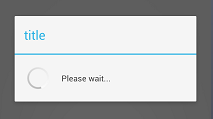
			final ProgressDialog dialog = ProgressDialog.show(this, "title", "Please wait...", true);
			new Thread(new Runnable(){
				public void run(){
					try {
						//模拟一个执行5秒种的操作
						Thread.sleep(5000);
						dialog.dismiss();//关闭对话框
					} catch (InterruptedException e){
						e.printStackTrace();
					}
				}
			}).start();
			break;
		case 1://显示有加载进度的对话框
			progressDialog = new ProgressDialog(this);
			progressDialog.setIcon(R.drawable.ic_launcher);
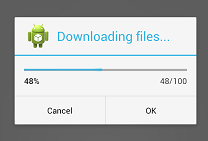
			progressDialog.setTitle("Downloading files...");
			progressDialog.setProgressStyle(ProgressDialog.STYLE_HORIZONTAL);
			progressDialog.setButton(DialogInterface.BUTTON_POSITIVE, "OK",
					new DialogInterface.OnClickListener() {
						@Override
						public void onClick(DialogInterface dialog, int which) {
							Toast.makeText(getBaseContext(), "OK clicked!", Toast.LENGTH_SHORT).show();
						}
					});
			progressDialog.setButton(DialogInterface.BUTTON_NEGATIVE, "Cancel",
					new DialogInterface.OnClickListener() {
						@Override
						public void onClick(DialogInterface dialog, int which) {
							Toast.makeText(getBaseContext(), "Cancel clicked!", Toast.LENGTH_SHORT).show();
						}
					});
			return progressDialog;
		}

		return null;
	}
}
运行效果(没有进度条的)
运行效果(有进度条的)
评论:
发表评论: