Semantic Kernel 工具调用
post by:追风剑情 2026-3-26 14:50
示例:让大模型调用自定义的函数工具
1、安装支持工具调用的大模型,例如:qwen2.5:7b-instruct-q4_K_M
ollama pull qwen2.5-coder:7b-instruct-q4_K_M
2、Program.cs
using System.ComponentModel;
using Microsoft.SemanticKernel;
using Microsoft.SemanticKernel.ChatCompletion;
using Microsoft.SemanticKernel.Connectors.Ollama;

// 1. 创建 Kernel
var builder = Kernel.CreateBuilder();
builder.AddOllamaChatCompletion(
    modelId: "qwen2.5:7b-instruct-q4_K_M",
    endpoint: new Uri("http://localhost:11434")
);
builder.Plugins.AddFromType<WeatherPlugin>();
var kernel = builder.Build();

// 2. 获取聊天服务
var chatService = kernel.GetRequiredService<IChatCompletionService>();

// 3. 配置执行设置(关键!)
var executionSettings = new OllamaPromptExecutionSettings
{
    FunctionChoiceBehavior = FunctionChoiceBehavior.Auto()   // 自动调用插件
};

// 4. 对话循环
var history = new ChatHistory();
history.AddSystemMessage("你是一个助手,当用户询问天气时,请使用 get_weather 工具。");

while (true)
{
    Console.Write("你:");
    var input = Console.ReadLine();
    if (string.IsNullOrWhiteSpace(input)) break;

    history.AddUserMessage(input);

    // 调用时传入 executionSettings 和 kernel
    var reply = await chatService.GetChatMessageContentAsync(
        history,
        executionSettings,
        kernel
    );

    Console.WriteLine($"AI:{reply.Content}");
    if (!string.IsNullOrEmpty(reply.Content))
        history.AddAssistantMessage(reply.Content);
}

// 1. 定义一个插件类,里面包含可以被AI调用的方法
public class WeatherPlugin
{
    [KernelFunction("get_weather")]
    [Description("获取指定城市的当前天气情况")]
    public string GetWeather(
        [Description("城市名称,例如'北京'或'上海'")] string city)
    {
        // 这里你可以调用真实的天气API,这里模拟一个返回结果
        return $"{city}当前天气:晴,温度25℃,微风。";
    }
}
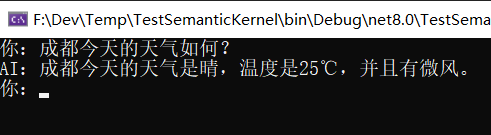
3、运行测试
评论:
发表评论: