GPU实例化技术(二)
post by:追风剑情 2024-12-29 11:14
开启GPU实例化后,Unity默认仅对材质相同,但位置不同的游戏对象进行批次化。如果想让材质相同,但其它属性不同的游戏对象执行批次化,就需要自定义shader。
示例:材质相同,颜色不同,添加GPU多例化支持
1、在外观着色器中给材质颜色变量增加GPU多例化支持
Shader "Custom/InstancedColorSurfaceShader"
{
    Properties
    {
        _Color ("Color", Color) = (1, 1, 1, 1)
        _MainTex ("Albedo (RGB)", 2D) = "white" {}
        _Glossiness("Smoothness", Range(0, 1)) = 0.5
        _Metallic("Metallic", Range(0, 1)) = 0.0
    }
        SubShader
        {
            Tags { "RenderType" = "Opaque" }
            LOD 200

            CGPROGRAM
            // 使用 Unity 3D 标准材质的光照模型,所有光源都启动阴影效果
            #pragma surface surf Standard fullforwardshadows
            // 使用 shader model 3.0
            #pragma target 3.0

            sampler2D _MainTex;
            struct Input
            {
                float2 uv_MainTex;
            };
            half _Glossiness;
            half _Metallic;

            //开始声明实例化变量
            UNITY_INSTANCING_BUFFER_START(Props)
            //声明实例化变量 _Color
            UNITY_DEFINE_INSTANCED_PROP(fixed4, _Color)
            //结束声明实例化变量
            UNITY_INSTANCING_BUFFER_END(Props)

            void surf (Input IN, inout SurfaceOutputStandard o)
            {
                fixed4 c = tex2D(_MainTex, IN.uv_MainTex) *
                    UNITY_ACCESS_INSTANCED_PROP(Props, _Color);
                o.Albedo = c.rgb;
                o.Metallic = _Metallic;
                o.Smoothness = _Glossiness;
                o.Alpha = c.a;
            }

        ENDCG
    }
    FallBack "Diffuse"
}
2、写个测试脚本,生成1000个小球
using System.Collections;
using System.Collections.Generic;
using UnityEngine;
/// <summary>
/// 测试GPU实例化技术
/// </summary>
public class GPUInstancedTest : MonoBehaviour
{
    public GameObject sphere;
    public int count = 500;
    public int radius = 200;

    void Start()
    {
        MaterialPropertyBlock props = new MaterialPropertyBlock();
        MeshRenderer renderer;

        for (int i=0; i<count; i++)
        {
            //随机颜色
            float r = Random.Range(0.0f, 1.0f);
            float g = Random.Range(0.0f, 1.0f);
            float b = Random.Range(0.0f, 1.0f);
            props.SetColor("_Color", new Color(r, g, b));
            //生成小球
            GameObject go = Instantiate<GameObject>(sphere);
            go.transform.SetParent(transform);
            go.transform.localPosition = Random.insideUnitSphere * radius;
            renderer = go.GetComponent<MeshRenderer>();
            renderer.SetPropertyBlock(props);
        }
    }
}
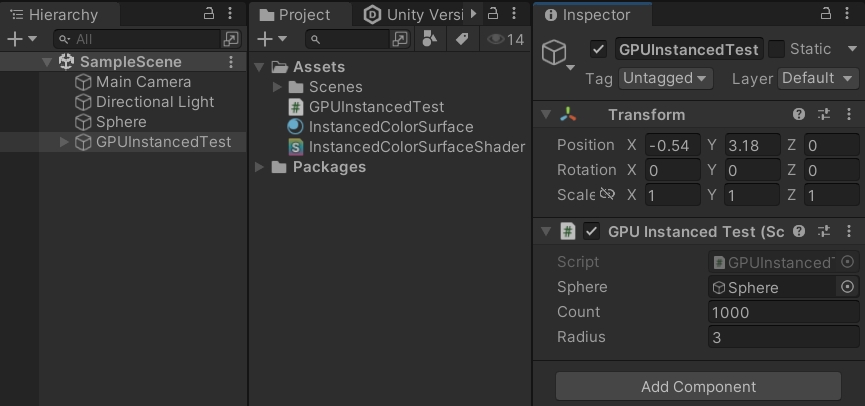
3、工程截图
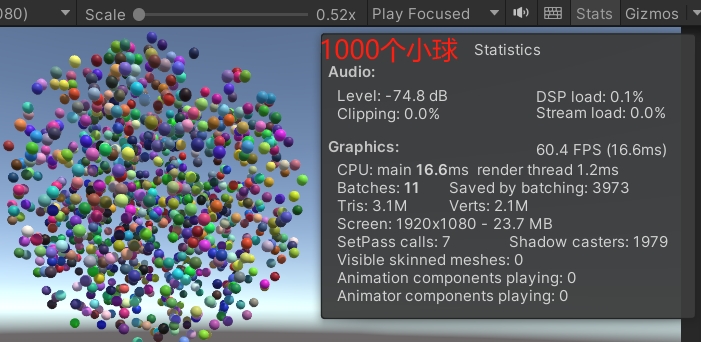
4、运行测试
评论:
发表评论: