UGUI—高斯模糊
post by:追风剑情 2024-4-15 19:26
1、工程截图
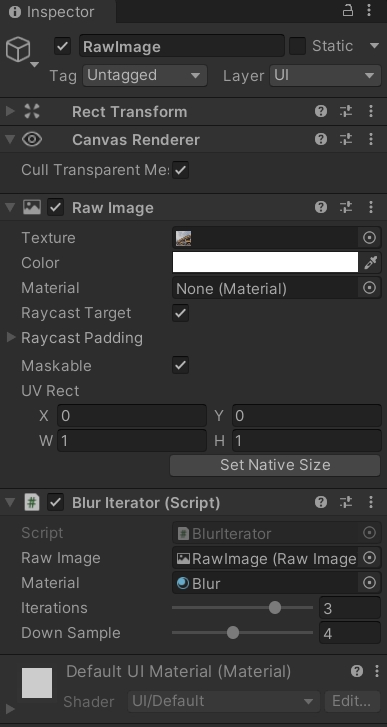
2、Shader
Shader "Custom/GaussBlur"
{
    Properties
    {
        _MainTex ("Texture", 2D) = "white" {}
    }
    SubShader
    {
        Tags { "Queue" = "Transparent" "RenderType" = "Transparent" }
        LOD 100

        Pass
        {
            Blend SrcAlpha OneMinusSrcAlpha

            CGPROGRAM
            #pragma vertex vert
            #pragma fragment frag

            #include "UnityCG.cginc"

            struct appdata
            {
                float4 vertex : POSITION;
                float2 uv : TEXCOORD0;
            };

            struct v2f
            {
                float2 uv : TEXCOORD0;
                float4 vertex : SV_POSITION;
            };

            sampler2D _MainTex;
            float4 _MainTex_ST;
            half4 _MainTex_TexelSize;

            v2f vert (appdata v)
            {
                v2f o;
                o.vertex = UnityObjectToClipPos(v.vertex);
                o.uv = TRANSFORM_TEX(v.uv, _MainTex);
                return o;
            }

            fixed4 blurFrag(v2f i)
            {
                //高斯模糊
                half3x3 tpl = half3x3(
                    half3(1, 2, 1),
                    half3(2, 4, 2),
                    half3(1, 2, 1)
                );
                half dividend = 16;

                /* 其他卷积模板,不同的卷积模板产生不同的模糊效果 */
                /*
                half3x3 tpl = half3x3(
                    half3(1, 1, 1),
                    half3(1, 1, 1),
                    half3(1, 1, 1)
                );
                half dividend = 9;

                half3x3 tpl = half3x3(
                    half3(1, 1, 1),
                    half3(1, 2, 1),
                    half3(1, 1, 1)
                );
                half dividend = 10;

                half3x3 tpl = half3x3(
                    half3(1, 1, 1),
                    half3(1, 0, 1),
                    half3(1, 1, 1)
                );
                half dividend = 8;

                half3x3 tpl = half3x3(
                    half3(0,  1/4, 0),
                    half3(1/4, 1, 1/4),
                    half3(0,  1/4, 0)
                );
                half dividend = 2;
                */

                //纹素宽度
                half tx = _MainTex_TexelSize.x;
                //纹素高度
                half ty = _MainTex_TexelSize.y;
                half x = i.uv.x;
                half y = i.uv.y;
                //3x3卷积模板(矩阵)
                half2 uv11 = half2(x - tx, y - ty);
                half2 uv12 = half2(x, y - ty);
                half2 uv13 = half2(x + tx, y - ty);
                half2 uv21 = half2(x - tx, y);
                half2 uv22 = half2(x, y);
                half2 uv23 = half2(x + tx, y);
                half2 uv31 = half2(x - tx, y + ty);
                half2 uv32 = half2(x, y + ty);
                half2 uv33 = half2(x + tx, y + ty);
                //对卷积模板对应的点进行纹理采样
                fixed4 c11 = tex2D(_MainTex, uv11) * tpl[0][0];
                fixed4 c12 = tex2D(_MainTex, uv12) * tpl[0][1];
                fixed4 c13 = tex2D(_MainTex, uv13) * tpl[0][2];
                fixed4 c21 = tex2D(_MainTex, uv21) * tpl[1][0];
                fixed4 c22 = tex2D(_MainTex, uv22) * tpl[1][1];
                fixed4 c23 = tex2D(_MainTex, uv23) * tpl[1][2];
                fixed4 c31 = tex2D(_MainTex, uv31) * tpl[2][0];
                fixed4 c32 = tex2D(_MainTex, uv32) * tpl[2][1];
                fixed4 c33 = tex2D(_MainTex, uv33) * tpl[2][2];
                //求平均值
                fixed4 col = (c11 + c12 + c13 + c21 + c22 + c23 + c31 + c32 + c33) / dividend;

                return col;
            }

            fixed4 frag (v2f i) : SV_Target
            {
                return blurFrag(i);
            }
            ENDCG
        }
    }
}
3、控制脚本
using System;
using UnityEngine;
using UnityEngine.UI;
/// <summary>
/// 模糊迭代器
/// </summary>
public class BlurIterator : MonoBehaviour
{
    [SerializeField]
    private RawImage m_RawImage;
    [SerializeField]
    private Material m_Material;
    //调整高斯模糊迭代次数
    [Range(0, 4)]
    public int iterations = 3;
    //降低采样数量
    [Range(1, 8)]
    public int downSample = 2;

    void Start()
    {
        Blur();
    }

    public void Blur()
    {
        if (m_RawImage.texture == null)
            return;

        int width = m_RawImage.texture.width / downSample;
        int height = m_RawImage.texture.height / downSample;

        RenderTexture buffer0 = RenderTexture.GetTemporary(width, height);
        buffer0.filterMode = FilterMode.Bilinear;
        Graphics.Blit(m_RawImage.texture, buffer0);

        //模糊迭代次数
        for (int i = 0; i < iterations; i++)
        {
            RenderTexture buffer1 = RenderTexture.GetTemporary(width, height, 0);
            //执行第一个Pass
            Graphics.Blit(buffer0, buffer1, m_Material, 0);
            RenderTexture.ReleaseTemporary(buffer0);
            buffer0 = buffer1;
        }
        m_RawImage.texture = CreateTexture2D(buffer0);
        RenderTexture.ReleaseTemporary(buffer0);
    }

    private Texture2D CreateTexture2D(RenderTexture rt)
    {
        int width = rt.width;
        int height = rt.height;
        Texture2D texture2D = new Texture2D(width, height, TextureFormat.ARGB32, false);
        RenderTexture.active = rt;
        texture2D.ReadPixels(new Rect(0, 0, width, height), 0, 0);
        texture2D.Apply();
        return texture2D;
    }
}
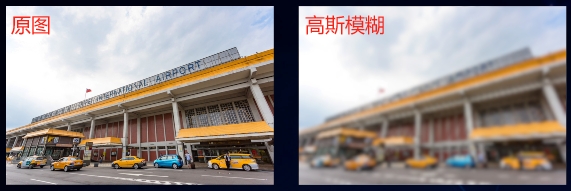
4、运行效果
评论:
发表评论: