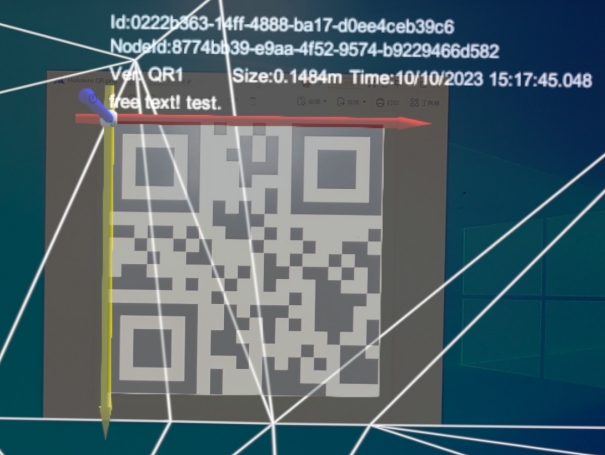
QR 码跟踪概述
QR 码跟踪
World Locking Tools for Unity Sample (二)QR Space Pins
创建 QR 码定位点
https://github.com/microsoft/MixedReality-QRCode-Sample
https://github.com/yl-msft/QRTracking
https://github.com/chgatla-microsoft/QRTracking
https://github.com/microsoft/MixedReality-WorldLockingTools-Samples
在线浏览Nuget上的包
https://www.nuget.org/packages
微软VCRTForwarders包下载地址
https://www.nuget.org/packages/Microsoft.VCRTForwarders.140
https://github.com/Microsoft/vcrt-forwarders
微软QR包下载址
https://www.nuget.org/Packages/Microsoft.MixedReality.QR
使用 Microsoft.MixedReality.QR 时,无需导入MRTK。
Untiy Nuget 插件下载地址
https://github.com/GlitchEnzo/NugetForUnity/releases
Unity菜单【NuGet】->"Manage NugGet Packages" 打开包管理器,搜索想要下载的包。
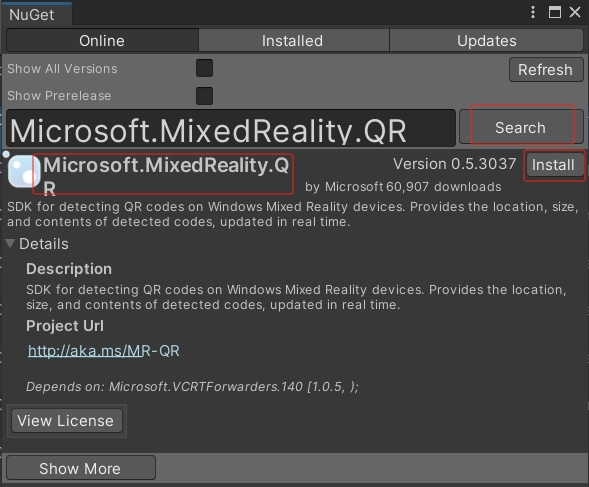
NugGet会自动下载依赖包
Nuget包缓存目录
打印缓存目录 Debug.Log(NugetForUnity.NugetHelper.PackOutputDirectory);
C:\Users\{自己电脑的用户名}\AppData\Local\NuGet\Cache
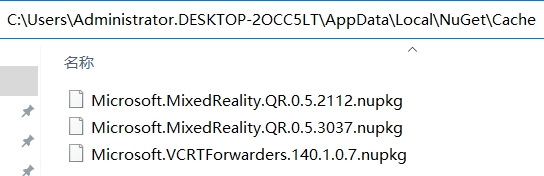
下载过程中可能会遇到的报错
1、Unity Nuget 安装 VCRTForwarders.140 时,报错:
InvalidDataException: End of Central Directory record could not be found.
原因:可能是缓存目录中的nuget包已损坏。
解决方案:删除缓存目录下的nuget包,重新下载。
2、Unity Nuget 安装 VCRTForwarders.140 时,报错:
Unable to install package Microsoft.VCRTForwarders.140 1.0.7
System.Net.WebException: Error getting response stream (ReadDoneAsync2): ReceiveFailure
原因:网络问题。
解决方案:换个网络下载,比如手机热点。
测试官方示例
Unity 2020.3.35f1c2
Unity NuGet 3.0.2
Microsoft.VCRTForwarders.140.1.0.7
Microsoft.MixedReality.QR.0.5.3037
HoloLens 2 (ARM or ARM64 均可正常运行)