图像粒子化
post by:追风剑情 2021-8-9 16:31
关键技术:GPU实例、Graphics.DrawMeshInstancedIndirect()
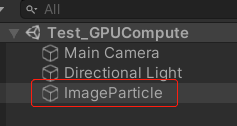
工程截图
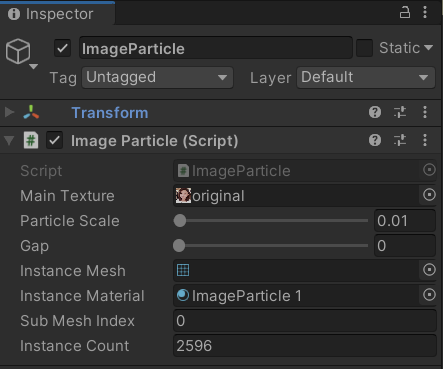
处理粒子化的Shader(仅支持DX11)
//图像粒子化Shader
Shader "Custom/ImageParticleShader" {
    Properties{
        //要显示的图像
        _MainTex("Albedo (RGB)", 2D) = "white" {}
        //粒子遮罩
        _MaskTex("Mask", 2D) = "white" {}
        _Glossiness("Smoothness", Range(0,1)) = 0.5
        _Metallic("Metallic", Range(0,1)) = 0.0
    }
        SubShader{
            Tags { "Queue" = "Transparent" "IgnoreProjector" = "True" "RenderType" = "Transparent" "PreviewType" = "Plane" }
            LOD 200
            Blend SrcAlpha OneMinusSrcAlpha
            ColorMask RGB
            Cull Off Lighting Off ZWrite Off

            CGPROGRAM
            // Physically based Standard lighting model
            #pragma surface surf Standard addshadow fullforwardshadows alpha:fade
            #pragma multi_compile_instancing
            //指定为每个顶点调用一次配置函数setup
            #pragma instancing_options procedural:setup

            sampler2D _MainTex;
            sampler2D _MaskTex;

            struct Input {
                float2 uv_MainTex;
            };

        #ifdef UNITY_PROCEDURAL_INSTANCING_ENABLED
            StructuredBuffer<float4> positionBuffer;
            StructuredBuffer<float4> blockBuffer;
        #endif

            void setup()
            {
                //仅应针对专为程序绘制而编译的着色器变体执行此操作
                //https://cloud.tencent.com/developer/article/1799606
            #ifdef UNITY_PROCEDURAL_INSTANCING_ENABLED
                float4 data = positionBuffer[unity_InstanceID];

                //设置转换矩阵,将顶点从对象空间转到世界空间
                //设置缩放
                unity_ObjectToWorld._11_21_31_41 = float4(data.w, 0, 0, 0);
                unity_ObjectToWorld._12_22_32_42 = float4(0, data.w, 0, 0);
                unity_ObjectToWorld._13_23_33_43 = float4(0, 0, data.w, 0);
                //设置坐标
                unity_ObjectToWorld._14_24_34_44 = float4(data.xyz, 1);
                //还有一个unity_WorldToObject矩阵,其中包含逆变换,用于变换法向量。当应用非均匀变形时,需要正确地变换方向矢量。
                //unity_WorldToObject与unity_ObjectToWorld互为逆变换
                unity_WorldToObject = unity_ObjectToWorld;
                //可以通过简单地使用负位置和缩放的倒数来构造它。
                unity_WorldToObject._14_24_34 *= -1;
                unity_WorldToObject._11_22_33 = 1.0f / unity_WorldToObject._11_22_33;
            #endif
            }

            half _Glossiness;
            half _Metallic;

            void surf(Input IN, inout SurfaceOutputStandard o)
            {
#ifdef UNITY_PROCEDURAL_INSTANCING_ENABLED
                float2 uv = IN.uv_MainTex;
                fixed4 mask = tex2D(_MaskTex, uv);
                //映射uv到一个像素块区域
                float4 block = blockBuffer[unity_InstanceID];
                uv.x = block.x + uv.x * block.z;
                uv.y = block.y + uv.y * block.w;
                fixed4 c = tex2D(_MainTex, uv);

                o.Albedo = c.rgb;
                o.Metallic = _Metallic;
                o.Smoothness = _Glossiness;
                o.Alpha = c.a * mask.a;
#else
                fixed4 col = tex2D(_MainTex, IN.uv_MainTex);
                o.Albedo = col.rgb;
                o.Metallic = _Metallic;
                o.Smoothness = _Glossiness;
                o.Alpha = col.a;
#endif
            }
            ENDCG
        }
            FallBack "Diffuse"
}
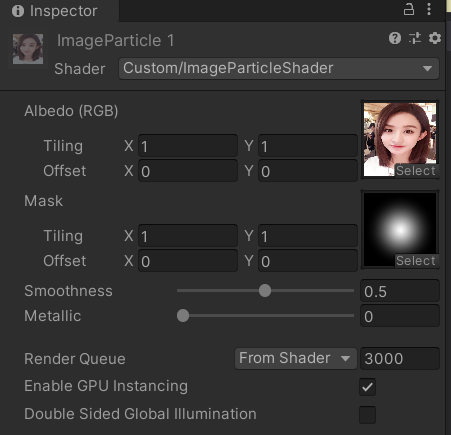
创建材质球
创建C#脚本
using UnityEngine;
/// <summary>
/// 图片粒子化
/// </summary>
public class ImageParticle : MonoBehaviour
{
    public Texture2D mainTexture;
    [Range(0.001f, 1)]
    public float particleScale = 0.01f;
    [Range(0f, 0.05f)]
    public float gap = 0f;
    public Mesh instanceMesh;
    public Material instanceMaterial;
    public int subMeshIndex = 0;
    public int instanceCount;

    private ComputeBuffer positionBuffer;
    private ComputeBuffer argsBuffer;
    private ComputeBuffer blockBuffer;

    //每个实例的索引数、实例数、起始索引位置、基顶点位置、起始实例位置
    private uint[] args = new uint[5] { 0, 0, 0, 0, 0 };
    private float gap_t = 1.87f;

    //创建粒子Mesh
    private Mesh CreateMesh()
    {
        //矩形的四个顶点坐标
        Vector3[] vertices = new Vector3[4];
        vertices[0] = new Vector3(0, 0, 0);
        vertices[1] = new Vector3(1f, 0, 0);
        vertices[2] = new Vector3(1f, 1f, 0);
        vertices[3] = new Vector3(0, 1f, 0);

        //三角形顶点索引
        int[] triangles = new int[6] { 0, 1, 2, 2, 3, 0 };

        //每个顶点的法线
        Vector3[] normals = new Vector3[4];
        normals[0] = new Vector3(0, 0, -5);
        normals[1] = new Vector3(0, 0, -5);
        normals[2] = new Vector3(0, 0, -5);
        normals[3] = new Vector3(0, 0, -5);

        //UV贴图坐标
        Vector2[] uvs = new Vector2[4];
        uvs[0] = new Vector2(0, 0);
        uvs[1] = new Vector2(1, 0);
        uvs[2] = new Vector2(1, 1);
        uvs[3] = new Vector2(0, 1);

        //顶点颜色
        Color32[] colors32 = new Color32[4];
        byte r = (byte)Random.Range(0, 255);
        Color32 color = new Color32(r, r, r, 255);
        colors32[3] = colors32[2] = colors32[1] = colors32[0] = color;
        //colors32[0] = new Color32(255, 0, 0, 255);
        //colors32[1] = new Color32(255, 0, 0, 255);
        //colors32[2] = new Color32(255, 0, 0, 255);
        //colors32[3] = new Color32(255, 0, 0, 255);


        Mesh mesh = new Mesh();
        mesh.hideFlags = HideFlags.DontSave;
        mesh.vertices = vertices;
        mesh.triangles = triangles;
        mesh.colors32 = colors32;
        mesh.uv = uvs;
        mesh.normals = normals;

        return mesh;
    }

    void Start()
    {
        if (instanceMesh == null)
            instanceMesh = CreateMesh();

        argsBuffer = new ComputeBuffer(1, args.Length * sizeof(uint), ComputeBufferType.IndirectArguments);
        UpdateBuffers();
    }

    void Update()
    {
        if (!Mathf.Approximately(gap, gap_t))
            UpdateBuffers();

        // GPU绘制实例
        Graphics.DrawMeshInstancedIndirect(instanceMesh, subMeshIndex, instanceMaterial, new Bounds(Vector3.zero, new Vector3(200.0f, 200.0f, 200.0f)), argsBuffer);
    }

    void UpdateBuffers()
    {
        // Ensure submesh index is in range
        if (instanceMesh != null)
            subMeshIndex = Mathf.Clamp(subMeshIndex, 0, instanceMesh.subMeshCount - 1);

        // Positions
        if (positionBuffer != null)
            positionBuffer.Release();

        // Pixel Block
        if (blockBuffer != null)
            blockBuffer.Release();

        // Pixel Block (每个粒子就是一个像素块)
        int blockWidth = 16;
        int blockHeight = 16;
        int blockXCount = mainTexture.width / blockWidth;
        int blockYCount = mainTexture.height / blockHeight;
        int blockCount = blockXCount * blockYCount;
        instanceCount = blockCount;
        int texWidth = blockXCount * blockWidth;
        int texHeight = blockYCount * blockHeight;
        float widthScale = (float)blockWidth / (float)texWidth;
        float heightScale = (float)blockHeight / (float)texHeight;
        blockBuffer = new ComputeBuffer(blockCount, 16);
        positionBuffer = new ComputeBuffer(blockCount, 16);
        Vector4[] blocks = new Vector4[blockCount];
        Vector4[] positions = new Vector4[blockCount];
        for (int y = 0; y < blockYCount; y++)
        {
            float v = (float)y / (float)blockYCount;
            for (int x = 0; x < blockXCount; x++)
            {
                float u = (float)x / (float)blockXCount;
                Vector4 block = new Vector4(u, v, widthScale, heightScale);
                int index = y * blockXCount + x;
                blocks[index] = block;
                positions[index] = new Vector4((particleScale + gap) * x, (particleScale + gap) * y, 0, particleScale);
            }
        }

        positionBuffer.SetData(positions);
        instanceMaterial.SetBuffer("positionBuffer", positionBuffer);

        blockBuffer.SetData(blocks);
        instanceMaterial.SetBuffer("blockBuffer", blockBuffer);

        gap_t = gap;

        // Indirect args
        if (instanceMesh != null)
        {
            args[0] = (uint)instanceMesh.GetIndexCount(subMeshIndex);
            args[1] = (uint)instanceCount;
            args[2] = (uint)instanceMesh.GetIndexStart(subMeshIndex);
            args[3] = (uint)instanceMesh.GetBaseVertex(subMeshIndex);
        }
        else
        {
            args[0] = args[1] = args[2] = args[3] = 0;
        }
        argsBuffer.SetData(args);

        instanceMaterial.SetTexture("_MainTex", mainTexture);
    }

    void OnDisable()
    {
        if (positionBuffer != null)
            positionBuffer.Release();
        positionBuffer = null;

        if (blockBuffer != null)
            blockBuffer.Release();
        blockBuffer = null;

        if (argsBuffer != null)
            argsBuffer.Release();
        argsBuffer = null;
    }
}
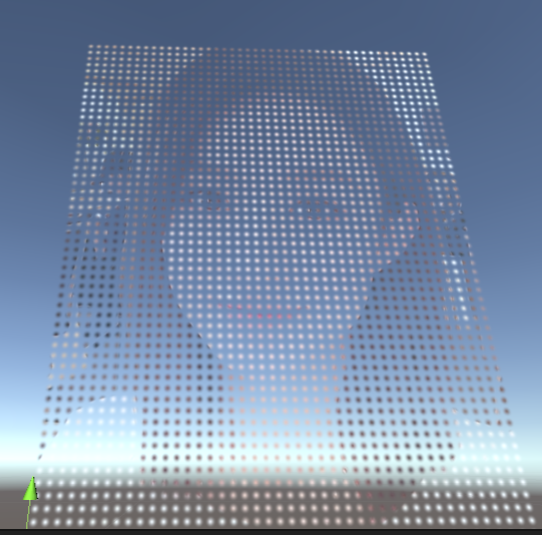
运行测试
Scene窗口截图
Game窗口截图
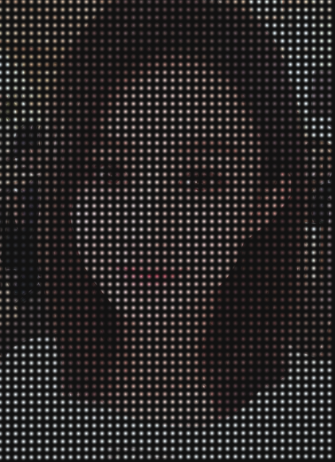
动态调整粒子间距

评论:
发表评论: