UGUI—合成Texture
post by:追风剑情 2020-10-11 14:53
一、ComposeTexture.shader
Shader "Custom/ComposeShader"
{
    Properties
    {
        _MainTex("Texture", 2D) = "white" {}
        _SecondTex("Texture", 2D) = "white" {}
    }
        SubShader
    {
        Tags { "Queue" = "Transparent" "RenderType" = "Transparent" }
        LOD 100

        Pass
        {
            Blend SrcAlpha OneMinusSrcAlpha

            CGPROGRAM
            #pragma vertex vert
            #pragma fragment frag
            #include "UnityCG.cginc"

            struct appdata
            {
                float4 vertex : POSITION;
                float2 uv : TEXCOORD0;
            };

            struct v2f
            {
                float2 uv : TEXCOORD0;
                float4 vertex : SV_POSITION;
            };

            sampler2D _MainTex;
            float4 _MainTex_ST;
            sampler2D _SecondTex;
            float4 _SecondTex_ST;

            v2f vert(appdata v)
            {
                v2f o;
                o.vertex = UnityObjectToClipPos(v.vertex);
                o.uv = TRANSFORM_TEX(v.uv, _MainTex);
                return o;
            }

            fixed4 frag(v2f i) : SV_Target
            {
                fixed4 col = tex2D(_MainTex, i.uv);
                fixed4 col2 = tex2D(_SecondTex, i.uv);
                //step(a, x) 如果x<a,返回0;否则,返回1
                //col2.a = step(0.95, col2.a);
                col.rgb = col.rgba * (1 - col2.a) + col2.rgba * col2.a;
                return col;
            }
            ENDCG
        }
    }
}
二、ComposeTexture.mat
三、ComposeTexture.cs
using System;
using System.Collections;
using System.Collections.Generic;
using UnityEngine;
using UnityEngine.UI;

public class ComposeTexture : MonoBehaviour
{
    [SerializeField]
    private Texture2D m_MainTex;
    [SerializeField]
    private Texture2D m_SecondTex;
    [SerializeField]
    private Material m_ComposeMat;
    [SerializeField]
    private RawImage m_RawImage;

    // Start is called before the first frame update
    void Start()
    {
        RenderTexture destRT = RenderTexture.GetTemporary(1024, 1024, 0, RenderTextureFormat.ARGB32);
        destRT.autoGenerateMips = false;

        //覆盖目标纹理
        //Graphics.ConvertTexture(m_Tex1, 0, destTex, 0);
        //判断对Graphics.CopyTexture() API的支持情况
        //Debug.LogFormat("SystemInfo.copyTextureSupport: {0}", SystemInfo.copyTextureSupport);

        //注意:
        //1、TextureFormat要一致才能复制,否则会报错
        //Graphics.CopyTexture with a region will not copy readable texture data for compressed formats (source texture format 12)
        //2、Mip Maps的个数要一致,或者都设为false,才能复制
        //Graphics.CopyTexture called with mismatching mip counts (src 11 dst 1)
        //3、尺寸要一致,否则报错
        //Graphics.CopyTexture called with mismatching sizes (src 2048x1024 dst 1024x1024)
        //Graphics.CopyTexture(m_Tex1, 0, destTex, 0);

        //将m_SecondTex合成到m_MainTex上
        m_ComposeMat.SetTexture("_SecondTex", m_SecondTex);
        Graphics.Blit(m_MainTex, destRT, m_ComposeMat);
        Texture2D destTex = ConvertTexture2D(destRT);
        destRT.Release();

        m_RawImage.texture = destTex;
    }

    //RenderTexture转Texture2D
    private Texture2D ConvertTexture2D(RenderTexture renderTexture)
    {
        int width = renderTexture.width;
        int height = renderTexture.height;
        Texture2D texture2D = new Texture2D(width, height, TextureFormat.ARGB32, false);
        RenderTexture.active = renderTexture;
        texture2D.ReadPixels(new Rect(0, 0, width, height), 0, 0);
        texture2D.Apply();
        return texture2D;
    }
}
四、创建RawImage

运行效果
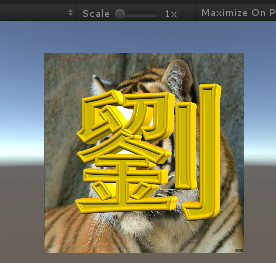
示例:下面这个shader可以实现将第二贴图绘制到主贴图的指定位置
//笔刷
Shader "Custom/BrushShader"
{
    Properties
    {
        _MainTex ("Texture", 2D) = "white" {}
        _BrushTex("Texture", 2D) = "white" {}
        //要绘制的位置(归一化坐标)
        _Position("Position", Vector) = (0, 0, 0, 0)
        //画笔尺寸/_MainTex尺寸
        _Scale("Scale", Vector) = (0, 0, 0, 0)
    }
    SubShader
    {
        Tags { "Queue" = "Transparent" "RenderType" = "Transparent" }
        LOD 100

        Pass
        {
            Blend SrcAlpha OneMinusSrcAlpha

            CGPROGRAM
            #pragma vertex vert
            #pragma fragment frag
            #include "UnityCG.cginc"

            struct appdata
            {
                float4 vertex : POSITION;
                float2 uv : TEXCOORD0;
            };

            struct v2f
            {
                float2 uv : TEXCOORD0;
                float4 vertex : SV_POSITION;
            };

            sampler2D _MainTex;
            float4 _MainTex_ST;
            sampler2D _BrushTex;
            float4 _BrushTex_ST;
            fixed4 _Position;
            fixed4 _Scale;

            v2f vert (appdata v)
            {
                v2f o;
                o.vertex = UnityObjectToClipPos(v.vertex);
                o.uv = TRANSFORM_TEX(v.uv, _MainTex);
                return o;
            }

            fixed4 frag (v2f i) : SV_Target
            {
                fixed4 col = tex2D(_MainTex, i.uv);
                if (i.uv.x >= _Position.x && i.uv.x <= _Position.z && i.uv.y >= _Position.y && i.uv.y <= _Position.w)
                {
                    fixed2 uv2 = fixed2( (1 - (_Position.x - i.uv.x) * _Scale.x) , (1 - (_Position.y - i.uv.y) * _Scale.y));
                    fixed4 col2 = tex2D(_BrushTex, uv2);
                    col.rgba = col2.rgba * col2.a + col.rgba * (1 - col2.a);
                }
                return col;
            }
            ENDCG
        }
    }
}
评论:
发表评论: