VBA导入导出txt
post by:追风剑情 2014-11-30 20:55
此文章以项目中的一个实际需求为例
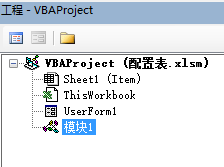
一、工程结构
二、UserForm1代码
Private Sub UserForm_Initialize()
    lastListIndex = 0
End Sub
Private Sub CommandButton1_Click()
    lastListIndex = UserForm1.ComboBox1.ListIndex
    ExportConfig (lastListIndex)
End Sub
三、模块1代码
Public Const MaxEdition = 4 '最大语言版本数
Public MaxParamCount As Integer '当前表参数个数
Public paramArr(100) As Variant '当前表参数数组
Public lastListIndex As Integer

Sub UIExportConfig()

    '计算当前表参数
    MaxParamCount = 0
    For p = 2 To 100 Step 1
        If Cells(1, p).Value <> "" Then
           paramArr(MaxParamCount) = Cells(1, p).Value
           MaxParamCount = MaxParamCount + 1
        End If
    Next p

    '初始化窗体内容
    UserForm1.ComboBox1.Clear
    Dim cellValue As String
    For j = 2 To MaxEdition + 1 Step 1
        cellValue = Cells(3, j).Value
        UserForm1.ComboBox1.AddItem (Cells(3, j))
    Next j
    UserForm1.ComboBox1.ListIndex = lastListIndex
    UserForm1.Show

End Sub

Sub ExportConfig(ByVal editionIndex)

    editionIndex = editionIndex + 2

    '检测模板文件
    Dim curPath As String, path As String
    curPath = ThisWorkbook.path & "\" & ActiveSheet.Name & ".txt"
    path = ThisWorkbook.path & "\template\" & ActiveSheet.Name & ".txt"
    If Dir(path) = Empty Then
        MsgBox ("Ä£°åÎļþ²»´æÔÚ" & Chr(10) & path)
        Exit Sub
    End If

    '打开模板文件
    Const ForReading = 1, ForWriting = 2, ForAppending = 8, TristateFalse = 0
    Dim sFile As Object, fso As Object
    Set fso = CreateObject("Scripting.FileSystemObject")
    Set sFile = fso.OpenTextFile(path, ForReading)

    Dim i As Integer, id As Integer
    Dim line As String, idStr As String
    Dim s As String
    s = ""

    '解析模板文件
    Do While Not sFile.AtEndOfStream
        line = sFile.ReadLine
        i = InStr(1, line, Chr(9))
        idStr = Mid(line, 1, i - 1)
        id = CInt(idStr)
        For p = 0 To MaxParamCount Step 1
            line = Replace(line, paramArr(p), Cells(id + 3, editionIndex + MaxEdition * p).Value)
        Next p
        s = s & line & Chr(13) & Chr(10)
    Loop

    sFile.Close
    Set sFile = Nothing
    Set fso = Nothing

    '生成配置文件
    Set fso = CreateObject("Scripting.FileSystemObject")
    Set sFile = fso.CreateTextFile(curPath, True, True) '¸²¸ÇÒÑ´æÔÚµÄÎļþ, Unicode±àÂë
    sFile.Write (s)
    sFile.Close
    Set sFile = Nothing
    Set fso = Nothing

    MsgBox ("成生配置文件完成" & Chr(10) & curPath)
    UserForm1.Hide

End Sub
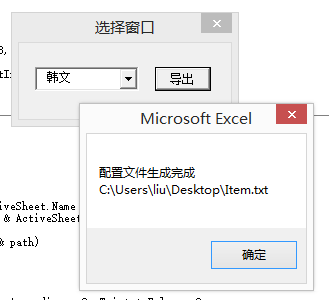
四、运行效果
评论:
发表评论: