C#调用C++接口
post by:追风剑情 2020-6-28 18:01
一、VS新建C++空项目
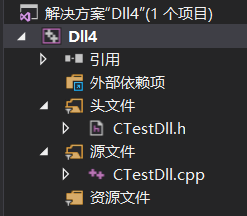
CTestDll.h
#ifndef __CTEST_DLL_H
#define __CTEST_DLL_H
// 声明为C编译、链接方式为外部函数
extern "C" _declspec(dllexport) int _cdecl add(int* x, int* y);
extern "C" _declspec(dllexport) int _cdecl sub(int x, int y);
#endif
CTestDll.cpp
#include "CTestDll.h"

#ifdef __cplusplus //如果是cpp文件
extern "C" //这部分代码按C编译
{
	int add(int* x, int* y)
	{
		return *x + *y;
	}

	int sub(int x, int y)
	{
		return x - y;
	}
}
#endif
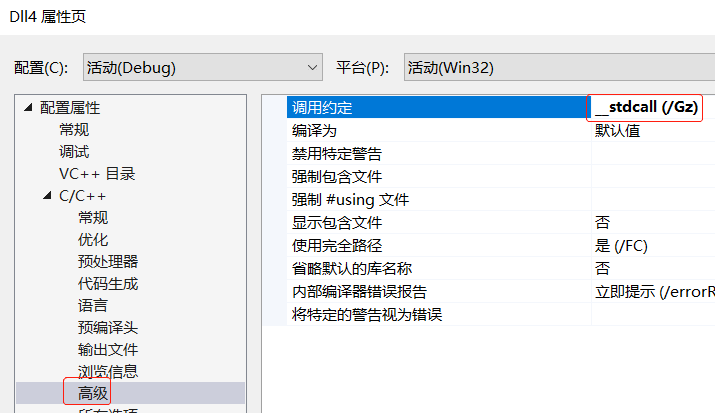
可能会出现的报错

重定义解决方法 (调用约定要与代码中写的一致)

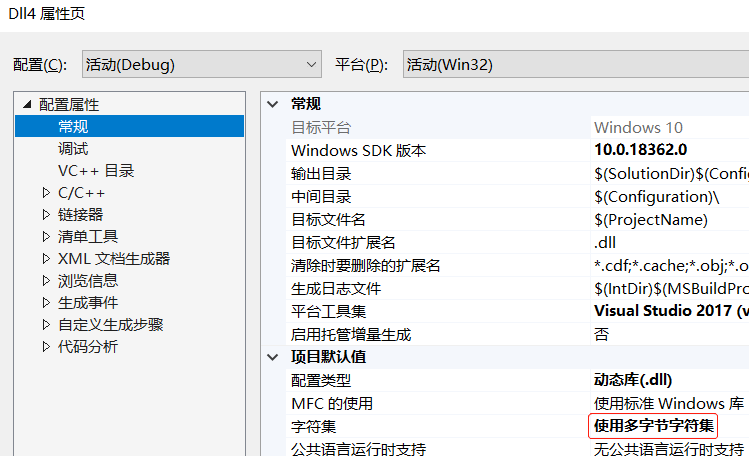
不兼容解决方法
using System;
using System.Collections.Generic;
using System.Linq;
using System.Text;
using System.Threading.Tasks;
using System.Runtime.InteropServices;

namespace ConsoleApp6
{
    class Program
    {
        [DllImport(@"Dll4.dll", EntryPoint = "add", CharSet = CharSet.Auto, CallingConvention = CallingConvention.Cdecl)]
        public static extern int add(ref int x, ref int y);
        [DllImport(@"Dll4.dll", EntryPoint = "sub", CharSet = CharSet.Auto, CallingConvention = CallingConvention.Cdecl)]
        public static extern int sub(int x, int y);

        static void Main(string[] args)
        {
            int x = 6, y = 5;
            int a = add(ref x, ref y);
            int b = sub(x, y);
            Console.WriteLine("a={0}, b={1}", a, b);
            Console.Read();
        }
    }
}
将C项目编译成dll并拷到bin\x64\Debug下面(即,与C#生成的exe文件同目录)
注意,64位的C#项目无法调用32位的DLL,这里的测试工程统一编译成64位。
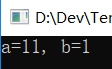
运行测试
评论:
发表评论: