UGUI—伤害飘字
post by:追风剑情 2020-3-31 14:45
一、工程截图
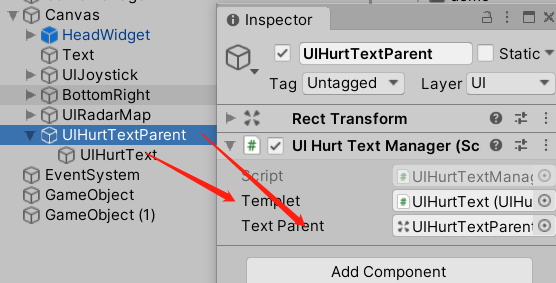
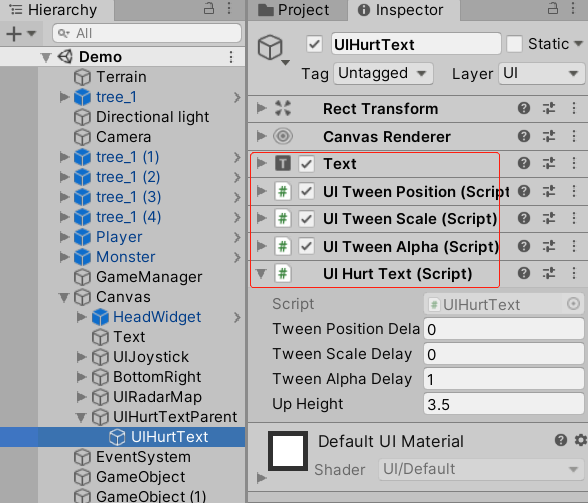
用到的缓动脚本
UITweenPosition
UITweenScale
UITweenAlpha
UIHurtText.cs
using System.Collections;
using System.Collections.Generic;
using UnityEngine;
using UnityEngine.UI;
/// <summary>
/// 显示伤害数字文本框
/// </summary>
public class UIHurtText : MonoBehaviour
{
    //各缓动延迟执行时间
    public float tweenPositionDelay = 0;
    public float tweenScaleDelay = 0;
    public float tweenAlphaDelay = 0;
    [Tooltip("上飘高度")]
    public float upHeight = 3.5f;

    private RectTransform rectTransform;
    private UITweenPosition tweenPosition;
    private UITweenScale tweenScale;
    private UITweenAlpha tweenAlpha;
    private Text text;

    private void Awake()
    {
        rectTransform = this.GetComponent<RectTransform>();
        tweenPosition = this.GetComponent<UITweenPosition>();
        tweenScale = this.GetComponent<UITweenScale>();
        tweenAlpha = this.GetComponent<UITweenAlpha>();

        tweenPosition.delayTime = tweenPositionDelay;
        tweenScale.delayTime = tweenScaleDelay;
        tweenAlpha.delayTime = tweenAlphaDelay;

        text = this.GetComponent<Text>();
    }

    public Vector2 anchoredPosition
    {
        set
        {
            rectTransform.anchoredPosition = value;
        }
    }

    // 播放伤害飘字
    public void Play(string s, Vector3 worldPosition)
    {
        gameObject.SetActive(true);
        text.text = s;
        //视口坐标,左下角(0,0), 右上角(1,1)
        //屏幕坐标,左下角(0,0), 右上角(Screen.width, Screen.height)
        //Vector3 viewportPosition = Camera.main.WorldToViewportPoint(worldPosition);
        //Vector3 screenPosition = Camera.main.ViewportToScreenPoint(viewportPosition);
        Vector3 screenPosition = Camera.main.WorldToScreenPoint(worldPosition);
        Vector3 screenPositionTo = Camera.main.WorldToScreenPoint(worldPosition + new Vector3(0, upHeight, 0));
        //Canvas的(0,0)坐标在屏幕中心
        screenPosition.x -= Screen.width / 2;
        screenPosition.y -= Screen.height / 2;
        screenPositionTo.x -= Screen.width / 2;
        screenPositionTo.y -= Screen.height / 2;
        tweenPosition.from = screenPosition;
        tweenPosition.to = screenPositionTo;
        tweenPosition.Reset();
        tweenScale.Reset();
        tweenAlpha.Reset();

        tweenPosition.Play();
        tweenScale.Play();
        tweenAlpha.Play();
    }

    // Alpha缓动完成回调
    public void OnTweenAlphaCompleted()
    {
        UIHurtTextManager.Instance.Release(this); //回收
    }
}
UIHurtTextTips.cs
using System.Collections;
using System.Collections.Generic;
using UnityEngine;

/// <summary>
/// 伤害文本提示
/// </summary>
public class UIHurtTextTips : MonoBehaviour
{
    public static UIHurtTextManager Instance { get; private set; }
    public UIHurtText templet;
    [SerializeField]
    private Transform textParent;
    private UIHeadTextPool pool;

    void Awake()
    {
        Instance = this;
    }

    void Start()
    {
        pool = new UIHeadTextPool();
        pool.parent = textParent;
        pool.templet = templet;
        templet.gameObject.SetActive(false);
    }

    // 显示伤害数值
    public void ShowHurtNumber(int num, Vector3 worldPosition)
    {
        ShowHurtText(string.Format("-{0}", num), worldPosition);
    }

    // 显示伤害文本
    public void ShowHurtText(string s, Vector3 worldPosition)
    {
        UIHurtText hurtText = pool.Get();
        hurtText.Play(s, worldPosition);
    }

    // 回收
    public void Release(UIHurtText element)
    {
        pool.Release(element);
    }

    // 文本对象池
    private class UIHeadTextPool
    {
        private readonly Stack<UIHurtText> m_Stack = new Stack<UIHurtText>();
        public int countAll { get; private set; }
        public Transform parent;
        public UIHurtText templet;

        public UIHurtText Get()
        {
            UIHurtText element;
            if (m_Stack.Count == 0)
            {
                element = GameObject.Instantiate(templet);
                element.transform.SetParent(parent);
                countAll++;
            }
            else
            {
                element = m_Stack.Pop();
            }
            return element;
        }

        public void Release(UIHurtText element)
        {
            if (m_Stack.Count > 0 && ReferenceEquals(m_Stack.Peek(), element))
                Debug.LogError("Internal error. Trying to destroy object that is already released to pool.");
            m_Stack.Push(element);
            element.gameObject.SetActive(false);
        }
    }
}
伤害飘字接口调用方式
int hurt = Random.Range(100, 100000);
//第2个参数为被攻击者的世界坐标
UIHurtTextManager.Instance.ShowHurtNumber(hurt, transform.position);
效果测试

评论:
发表评论: