两侧渐变
post by:追风剑情 2019-11-19 13:08
一、工程截图
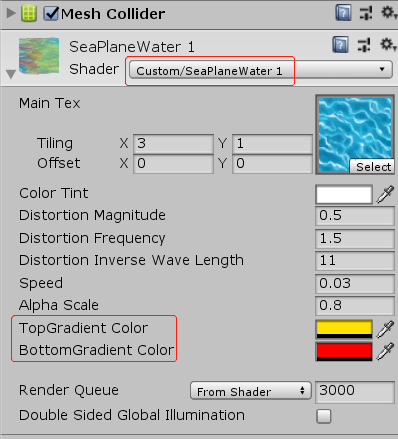
// 支持顶部与底部同时渐变
Shader "Custom/SeaPlaneWater 1" {
	Properties{
		//河流纹理
		_MainTex("Main Tex", 2D) = "white" {}
		//控制整体颜色
		_Color("Color Tint", Color) = (1, 1, 1, 1)
		//控制水流波动的幅度
		_Magnitude("Distortion Magnitude", float) = 1
		//控制波动频率
		_Frequency("Distortion Frequency", float) = 1
		//控制波长的倒数(值越大,波长越小)
		_InvWaveLength("Distortion Inverse Wave Length", float) = 10
		//控制河流纹理的移动速度
		_Speed("Speed", float) = 0.5
		_AlphaScale("Alpha Scale", float) = 1.0
		//渐变颜色
		_GradientTopColor("TopGradient Color", Color) = (1, 0, 0, 0)
		//渐变颜色
		_GradientBottomColor("BottomGradient Color", Color) = (1, 0, 0, 0)
	}
		SubShader{
		//本示例需要在模型空间实现顶点动画,所以需要关闭批处理。
		//"DisableBatching"="True"关闭批处理,这是因为批处理会合并所有相关的模型,而这些模型各自的模型空间就会丢失。
		Tags { "Queue" = "Transparent" "IgnoreProjector" = "True" "RenderType" = "Transparent" "DisableBatching" = "True" }
		LOD 200

		Pass {
			Tags {"LightMode" = "ForwardBase"}
			//这里关闭了深度写入,开启并设置了混合模式,并关闭了剔除功能。这是为了让水流的每个面都能显示
			ZWrite Off
			Blend SrcAlpha OneMinusSrcAlpha
			Cull Off

			CGPROGRAM
			#pragma vertex vert
			#pragma fragment frag
			#pragma multi_compile_fog
			#include "UnityCG.cginc"
			#include "Lighting.cginc"

			sampler2D _MainTex;
			float4 _MainTex_ST;
			float4 _Color;
			float _Magnitude;
			float _Frequency;
			float _InvWaveLength;
			float _Speed;
			float _AlphaScale;
			fixed4 _GradientTopColor;
			fixed4 _GradientBottomColor;

			struct a2v {
				float4 vertex : POSITION;
				float4 texcoord : TEXCOORD0;
			};

			struct v2f {
				float4 pos : SV_POSITION;
				half2 uv : TEXCOORD0;
				UNITY_FOG_COORDS(1)
			};

			v2f vert(a2v v)
			{
				v2f o;
				float4 offset;
				//只希望对顶点的x方向进行位移,因此yzw的位移量被设置为0
				offset.yzw = float3(0.0, 0.0, 0.0);
				//然后,利用_Frequency属性和内置的_Time.y变量来控制正弦函数的频率。
				//为了让不同位置具有不同的位移,我们对上述结果加上了模型空间下的位置分量,并乘以_InvWaveLength来控制波长。
				//最后,我们对结果值乘以_Magnitude属性来控制波动幅度,得到最终位移。
				offset.x = sin(_Frequency * _Time.y + v.vertex.x * _InvWaveLength + v.vertex.y * _InvWaveLength + v.vertex.z * _InvWaveLength) * _Magnitude;
				//剩下的工作,我们只需要把位移量添加到顶点位置上,再进行正常的顶点变换即可。
				o.pos = UnityObjectToClipPos(v.vertex + offset);
				o.uv = TRANSFORM_TEX(v.texcoord, _MainTex);
				o.uv += float2(0.0, _Time.y * _Speed);
				UNITY_TRANSFER_FOG(o, o.pos);
				return o;
			}

			//片元着色器的代码非常简单,只需要对纹理采样再添加颜色控制即可
			fixed4 frag(v2f i) : SV_Target
			{
				fixed4 c = tex2D(_MainTex, i.uv);
				c.rgb *= _Color.rgb;
				c.a *= _AlphaScale;

				//两侧渐变
				fixed center_x = _MainTex_ST.x / 2;
				fixed s = step(i.uv.x, center_x);
				fixed4 gradientColor = _GradientTopColor * s + _GradientBottomColor * (1 - s);
				fixed t = abs(i.uv.x - center_x);
				c = lerp(c, gradientColor, t / 2);

				UNITY_APPLY_FOG(i.fogCoord, c);
				return c;
			}
			ENDCG
		}
	}
		//也可以关闭Fallback
				FallBack "Transparent/VertexLit"
}
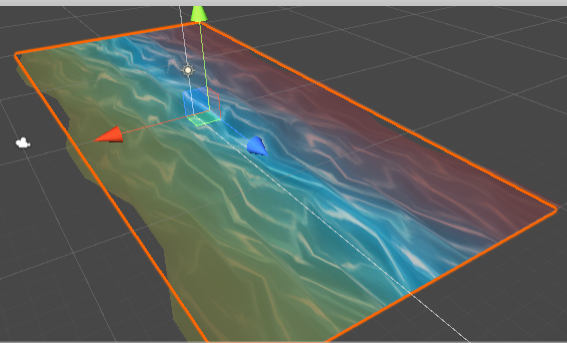
效果
评论:
发表评论: