UGUI—RPG角色行走控制摇杆
post by:追风剑情 2019-10-14 17:31
工程截图
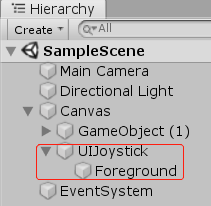
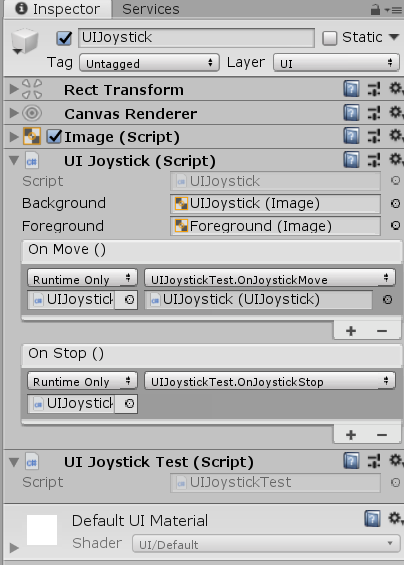
UIJoystick.cs
using System;
using UnityEngine;
using UnityEngine.UI;
using UnityEngine.Events;
using UnityEngine.EventSystems;
using UnityEngine.Serialization;
/// <summary>
/// 摇杆
/// </summary>
public class UIJoystick : MonoBehaviour, IPointerDownHandler, IPointerUpHandler, IDragHandler
{
    [SerializeField] private Image m_Background;
    [SerializeField] private Image m_Foreground;

    private RectTransform m_BackgroundRect;
    private RectTransform m_ForegroundRect;
    private float constraintRadius = 0;
    private float sqrMagnitude = 0;

    // 定义摇杆事件类
    [Serializable]
    public class OnBeginEvent : UnityEvent { }
    [Serializable]
    public class OnMoveEvent : UnityEvent { }
    [Serializable]
    public class OnStopEvent : UnityEvent { }

    // 防止序列化变量重命名后丢失引用
    [FormerlySerializedAs("onBegin")]
    [SerializeField]
    private OnBeginEvent m_OnBegin = new OnBeginEvent();
    [FormerlySerializedAs("onMove")]
    [SerializeField]
    private OnMoveEvent m_OnMove = new OnMoveEvent();

    [FormerlySerializedAs("onStop")]
    [SerializeField]
    private OnStopEvent m_OnStop = new OnStopEvent();

    public Vector2 normalized { get; private set; }

    void Awake()
    {
        m_Background.alphaHitTestMinimumThreshold = 0.1f;
        m_BackgroundRect = m_Background.GetComponent<RectTransform>();
        m_ForegroundRect = m_Foreground.GetComponent<RectTransform>();
        constraintRadius = (m_BackgroundRect.sizeDelta.x - m_ForegroundRect.sizeDelta.x) / 2;
        sqrMagnitude = constraintRadius * constraintRadius;
    }

    private void OnEnable()
    {
        m_ForegroundRect.anchoredPosition = Vector2.zero;
    }

    private Vector2 foregroundPosition
    {
        get { return m_ForegroundRect.anchoredPosition; }
        set { m_ForegroundRect.anchoredPosition = value; }
    }

    public void OnPointerDown(PointerEventData eventData)
    {
        Normalize(eventData);
        m_OnBegin.Invoke();
        m_OnMove.Invoke();
    }

    public void OnPointerUp(PointerEventData eventData)
    {
        foregroundPosition = Vector2.zero;
        m_OnStop.Invoke();
    }

    public void OnDrag(PointerEventData eventData)
    {
        if (!eventData.IsPointerMoving())
            return;
        Normalize(eventData);
        m_OnMove.Invoke();
    }

    private void Normalize(PointerEventData eventData)
    {
        //eventData.pressPosition: 事件触发时鼠标或手指的坐标
        //eventData.position: 为鼠标或手指的实时坐标
        foregroundPosition = ScreenPointToLocalPointInRectangle(eventData.position);
        normalized = foregroundPosition.normalized;

        //考虑到摄像机可能存在旋转(仅考虑绕Y轴旋转)
        //需要将摇杆方向矢量做一次与像机旋转方向相反的旋转。
        float cameraAngleY = -Camera.main.transform.localEulerAngles.y;
        float cameraRadianY = cameraAngleY / 180 * Mathf.PI;
        //旋转基向量
        Vector2 i = new Vector2(Mathf.Cos(cameraRadianY), Mathf.Sin(cameraRadianY));
        Vector2 j = new Vector2(-Mathf.Sin(cameraRadianY), Mathf.Cos(cameraRadianY));
        normalized = normalized.x * i + normalized.y * j;
        normalized.Normalize();
    }

    private Vector2 ScreenPointToLocalPointInRectangle(Vector2 screenPoint)
    {
        Vector2 localPoint = Vector2.zero;
        RectTransformUtility.ScreenPointToLocalPointInRectangle(m_BackgroundRect, screenPoint, null, out localPoint);
        return GetAdjustedPosition(localPoint);
    }

    private Vector2 GetAdjustedPosition(Vector2 pos)
    {
        //sqrMagnitude: 开方前的值
        //magnitude: 开方后的值
        if (pos.sqrMagnitude <= sqrMagnitude)
            return pos;
        float magnitude = pos.magnitude;
        float cos = pos.x / magnitude;
        float sin = pos.y / magnitude;
        float x = constraintRadius * cos;
        float y = constraintRadius * sin;
        pos.x = x;
        pos.y = y;
        return pos;
    }
}
UIJoystickTest.cs
using System.Collections;
using System.Collections.Generic;
using UnityEngine;

public class UIJoystickTest : MonoBehaviour
{
    public void OnJoystickMove(UIJoystick joystick)
    {
        Debug.LogFormat("Joystick Move: {0}", joystick.normalized);
    }

    public void OnJoystickStop()
    {
        Debug.Log("Joystick Stop");
    }
}
运行测试
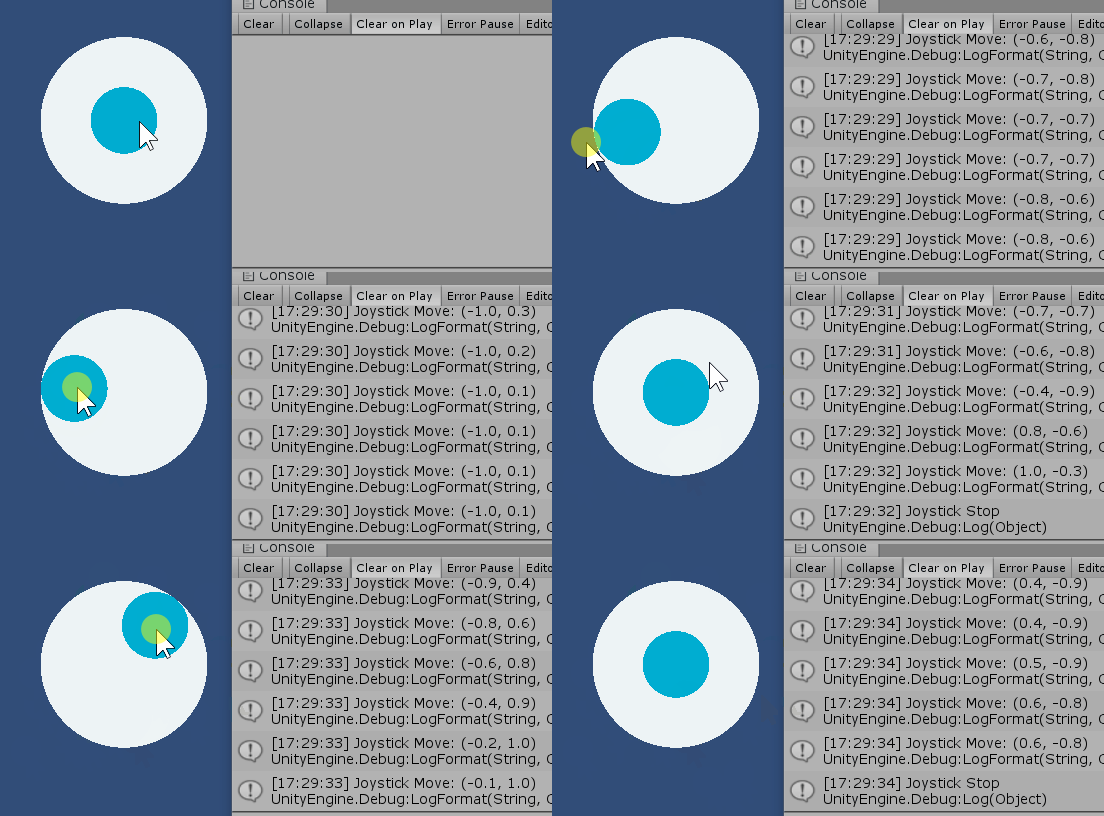
示例:摇杆与导航配合控制玩家行走
using System.Collections;
using System.Collections.Generic;
using UnityEngine;
using UnityEngine.EventSystems;
using UnityEngine.AI;

public class PlayerController : MonoBehaviour
{
    private Transform mTransform;
    private NavMeshAgent agent;

    private bool joysticking = false;
    private Vector3 joystickForward = Vector3.zero;
    private float lastPointerDownTime = 0;

    private void Awake()
    {
        mTransform = transform;
        agent = this.GetComponent<NavMeshAgent>();
    }

    //判断 鼠标/手指 Click
    private bool IsPointerClick()
    {
        if (Input.touchSupported)
        {
            if (Input.touchCount > 0)
            {
                if (Input.GetTouch(0).phase == TouchPhase.Began)
                    lastPointerDownTime = Time.realtimeSinceStartup;
                if (Input.GetTouch(0).phase == TouchPhase.Ended)
                    return Time.realtimeSinceStartup - lastPointerDownTime < 0.2f;
            }
            return false;
        }

        if (Input.GetMouseButtonDown(0))
            lastPointerDownTime = Time.realtimeSinceStartup;
        if (Input.GetMouseButtonUp(0))
            return Time.realtimeSinceStartup - lastPointerDownTime < 0.2f;

        return false;
    }

    void Update()
    {
        //导航到鼠标点击位置
        if (IsPointerClick())
        {
            bool overUI = false;
            if (Input.touchSupported)
                overUI = Input.touchCount > 0 && EventSystem.current.IsPointerOverGameObject(Input.GetTouch(0).fingerId);
            else
                overUI = EventSystem.current.IsPointerOverGameObject();
            if (overUI)
                return; //点在了UGUI上

            Vector3 mousePosition = Input.mousePosition;
            Ray ray = Camera.main.ScreenPointToRay(mousePosition);
            RaycastHit hit;
            if (Physics.Raycast(ray, out hit))
            {
                agent.isStopped = false;
                agent.stoppingDistance = 0f;
                agent.SetDestination(hit.point);
            }
        }

        if (joysticking)
            agent.Move(joystickForward * agent.speed * Time.deltaTime);
    }

    // UIJoystick Begin Event
    public void OnUIJoystickBegin()
    {
        joysticking = true;
        if (!agent.isStopped)
            agent.isStopped = true;//终止之前的寻路
    }

    // UIJoystick Move Event
    public void OnUIJoystickMove(UIJoystick joystick)
    {
        Vector3 forward = new Vector3(joystick.normalized.x, 0, joystick.normalized.y);
        mTransform.rotation = Quaternion.LookRotation(forward, Vector3.up);
        joystickForward = forward;
    }

    // UIJoystick Stop Event
    public void OnUIJoystickStop()
    {
        joysticking = false;
    }
}
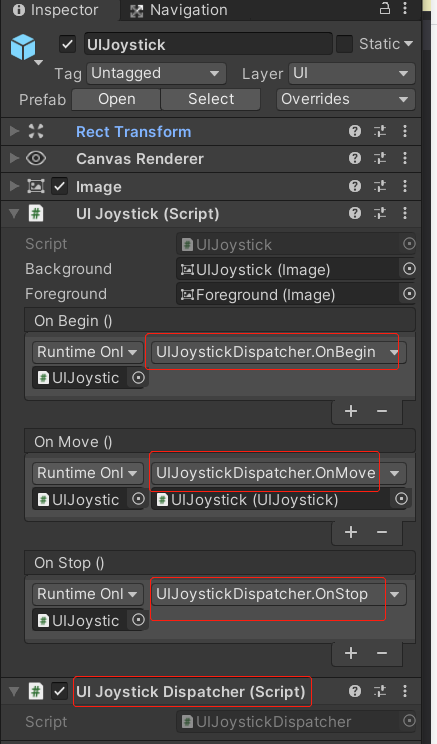
使用UIJoystickDispatcher使摇杆与角色模块解耦
using UnityEngine;
/// <summary>
/// 调度摇杆事件
/// 将摇杆功能与其他响应模块解耦
/// </summary>
public class UIJoystickDispatcher : GameEventBehaviour
{
    public void OnBegin()
    {
        FireEvent(GameEventType.UI_JOYSTICK_BEGIN);
    }

    public void OnMove(UIJoystick joystick)
    {
        JoystickMove move = new JoystickMove();
        move.forward = new Vector3(joystick.normalized.x, 0, joystick.normalized.y);
        move.rotation = Quaternion.LookRotation(move.forward, Vector3.up);
        FireEvent(GameEventType.UI_JOYSTICK_MOVE, move);
    }

    public void OnStop()
    {
        FireEvent(GameEventType.UI_JOYSTICK_STOP);
    }
}

public struct JoystickMove
{
    //前进方向
    public Vector3 forward;
    //旋转方位
    public Quaternion rotation;
}
评论:
发表评论: