触控旋转及缩放模型
post by:追风剑情 2019-8-30 17:06
示例:直接在官方示例上改的
import { ui } from "./../ui/layaMaxUI";
/**
 * 本示例采用非脚本的方式实现,而使用继承页面基类,实现页面逻辑。在IDE里面设置场景的Runtime属性即可和场景进行关联
 * 相比脚本方式,继承式页面类,可以直接使用页面定义的属性(通过IDE内var属性定义),比如this.tipLbll,this.scoreLbl,具有代码提示效果
 * 建议:如果是页面级的逻辑,需要频繁访问页面内多个元素,使用继承式写法,如果是独立小模块,功能单一,建议用脚本方式实现,比如子弹脚本。
 */
export default class GameUI extends ui.test.TestSceneUI {

    // 触控操作的对象
    private box: Laya.MeshSprite3D;
    // 当前加载的模型
    private cabin:Laya.MeshSprite3D;
    // 一个日志文本框
    private logTextArea:Laya.TextArea;

    private _scene: Laya.Scene3D;

    constructor() {
        super();

        //初始化引擎
		Laya3D.init(0, 0);
        //适配模式
        Laya.stage.fullScreenEnabled = true;
		Laya.stage.scaleMode = Laya.Stage.SCALE_FULL;
        Laya.stage.screenMode = Laya.Stage.SCREEN_VERTICAL;
        Laya.stage.frameRate = Laya.Stage.FRAME_SLOW;
		//开启统计信息
		//Laya.Stat.show(Laya.Browser.clientWidth - 180);

        //添加3D场景
        this._scene = Laya.stage.addChild(new Laya.Scene3D()) as Laya.Scene3D;

        //添加照相机
        var camera: Laya.Camera = (this._scene.addChild(new Laya.Camera(0, 0.1, 100))) as Laya.Camera;
        camera.transform.translate(new Laya.Vector3(0, 2, 3));
        camera.transform.rotate(new Laya.Vector3(-30, 0, 0), true, false);

        //添加方向光
        var directionLight: Laya.DirectionLight = this._scene.addChild(new Laya.DirectionLight()) as Laya.DirectionLight;
        directionLight.color = new Laya.Vector3(0.6, 0.6, 0.6);
        directionLight.transform.worldMatrix.setForward(new Laya.Vector3(1, -1, 0));

        //添加自定义模型
        // this.box = this._scene.addChild(new Laya.MeshSprite3D(Laya.PrimitiveMesh.createBox(1, 1, 1))) as Laya.MeshSprite3D;
        // this.box.transform.rotate(new Laya.Vector3(0, 45, 0), false, false);
        // //this.box.transform.localScale = new Laya.Vector3(1, 1, 1);
        // var material: Laya.BlinnPhongMaterial = new Laya.BlinnPhongMaterial();
        // material.albedoColor = new Laya.Vector4(1, 1, 0, 1);//反射光颜色(偏黄)
		// Laya.Texture2D.load("res/layabox.png", Laya.Handler.create(null, function(tex:Laya.Texture2D) {
		// 		material.albedoTexture = tex;
		// }));
        // this.box.meshRenderer.material = material;

        //资源url
        var meshUrl = "res/models/FurnishedCabin/Meshes/Sofa-Sofa.lm";
        var materialUrl = "res/models/FurnishedCabin/Meshes/Materials/Chairs_MAT.lmat";

        //加载Mesh
        Laya.Mesh.load(meshUrl, Laya.Handler.create(this, function(mesh){
            this.cabin = new Laya.MeshSprite3D(mesh);
            this._scene.addChild(this.cabin);
            //加载Material
            Laya.PBRStandardMaterial.load(materialUrl, Laya.Handler.create(this, function(material) {
                this.cabin.meshRenderer.material = material;
            }, null, true));
            this.box = this.cabin;
        }, null, true));

        Laya.MouseManager.multiTouchEnabled = true;
        Laya.stage.on(Laya.Event.MOUSE_DOWN,this, this.onMouseDown);
        Laya.stage.on(Laya.Event.MOUSE_UP,this, this.onMouseUp);

        this.logTextArea = new Laya.TextArea("");
        this.logTextArea.mouseEnabled = false;
        this.logTextArea.text = "";
        this.logTextArea.multiline = true;
        this.logTextArea.color = "#00FF00";
        this.logTextArea.fontSize = 50;
        this.logTextArea.width = 1000;
        this.logTextArea.height = Laya.Browser.clientHeight * 3;
        Laya.stage.addChild(this.logTextArea);

        //每帧驱动onLoop()方法
        Laya.timer.frameLoop(1, this, this.onLoop, null, false);

    }

    // 旋转控制开关
    private _rotationEnabled = false;
    // 旋转因子,用来调节旋转灵敏度
    private _factor = 0.3;
    // 旋转角度
    private _rotation = new Laya.Vector3(0, 0, 0);
    // 记录按下时的坐标
    private _downX = -1;
    private _downY = -1;

    // 缩放控制开关
    private _scaleEnabled = false;
    // 缩放因子,用来调节缩放灵敏度s
    private _scaleFactor = 0.000001;
    // 记录上一帧两触控点距离
    private _touchDistance = 0;
    // 记录缩放值
    private _scale: Laya.Vector3 = new Laya.Vector3(1, 1, 1);
    private _twoFirst = true;

    private onMouseDown(e:Laya.Event):void
    {
        var touches: Array<any> = e.touches;
        //在支持触控的设备上才有值
        if (touches == undefined)
            return;
        var touchCount = touches.length;
        switch(touchCount)
        {
            case 1:
                this.stopScale();
                this.beginRotation();
                break;
            case 2:
                this.stopRotation();
                this.beginScale();
                break;
            default:
                this.stopRotation();
                this.stopScale();
                break;
        }
    }

    private onMouseUp(e:Laya.Event):void
    {
        var touches: Array<any> = e.touches;
        //在支持触控的设备上才有值
        if (touches == undefined)
            return;
        var touchCount = touches.length;
        switch(touchCount)
        {
            case 1:
                this.stopScale();
                this.beginRotation();
                break;
            case 2:
                this.stopRotation();
                this.beginScale();
                break;
            default:
                this.stopRotation();
                this.stopScale();
                break;
        }
    }

    // 开始旋转
    private beginRotation():void
    {
        this._downX = Laya.stage.mouseX;
        this._downY = Laya.stage.mouseY;
        this._rotationEnabled = true;
    }

    // 停止旋转
    private stopRotation():void
    {
        this._rotationEnabled = false;
    }

    // 开始缩放
    private beginScale():void
    {
        this._touchDistance = this.getTouch2Distance();
        this._scaleEnabled = true;
    }

    // 停止缩放
    private stopScale()
    {
        this._scaleEnabled = false;
        this._twoFirst = true;
    }

    // 获取两个触控点的距离
    private getTouch2Distance(): number
    {
        var touchCount = this._scene.input.touchCount();
        if (2 !== touchCount)
            return 0;

        var touch = this._scene.input.getTouch(0);
        var touch2 = this._scene.input.getTouch(1);

        var vec = Vector2Util.subtraction(touch2.position, touch.position);
        var distance = Vector2Util.getLengthSquared(vec);
        return distance;
    }

    public onLoop():void
    {
        if (this._rotationEnabled)
        {
            var mouseX = Laya.stage.mouseX;
            var mouseY = Laya.stage.mouseY;
            var deltaX = mouseX - this._downX;
            var deltaY = mouseY - this._downY;
            this._downX = mouseX;
            this._downY = mouseY;

            this._rotation.x = deltaY * this._factor;
            this._rotation.y = deltaX * this._factor;
            this.box.transform.rotate(this._rotation, false, false);
        }

        if (this._scaleEnabled)
        {
            if (this._twoFirst)
            {
                this._touchDistance = this.getTouch2Distance();
                this._twoFirst = false;
            }
            else
            {
                var distance = this.getTouch2Distance();
                var touchScale = (distance - this._touchDistance) * this._scaleFactor;
                this._touchDistance = distance;

                this._scale.x += touchScale;
                this._scale.y += touchScale;
                this._scale.z += touchScale;

                this.box.transform.scale = this._scale;
            }
        }
    }

    private showLog(text:string)
    {
        this.logTextArea.text += text + "\n";
    }
}

class Vector2Util
{
    public static getLengthSquared(vec: Laya.Vector2)
    {
        return vec.x*vec.x + vec.y*vec.y;
    }

    public static getLength(vec: Laya.Vector2): number
    {
        var s = Vector2Util.getLengthSquared(vec);
        return Math.sqrt(s);
    }

    public static subtraction(vec1: Laya.Vector2, vec2: Laya.Vector2)
    {
        var vec = new Laya.Vector2();
        vec.x = vec1.x - vec2.x;
        vec.y = vec1.y - vec2.y;
        return vec;
    }

    public static multiply(vec: Laya.Vector2, factor: number): Laya.Vector2
    {
        var v = new Laya.Vector2();
        v.x = vec.x * factor;
        v.y = vec.y * factor;
        return v;
    }
}

class Vector3Util
{
    public static scale(vec: Laya.Vector3, factor: number): Laya.Vector3
    {
        var v = new Laya.Vector3();
        v.x = vec.x * factor;
        v.y = vec.y * factor;
        v.z = vec.z * factor;
        return v;
    }
}
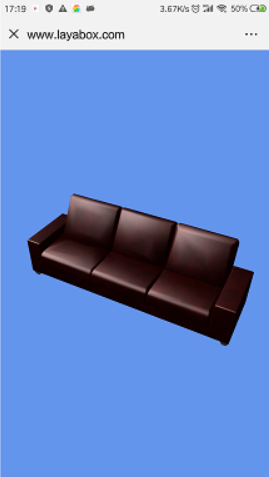
运行效果
单指旋转模型,双指缩放模型
评论:
发表评论: