WPF—ControlTemplate
post by:追风剑情 2019-8-27 14:19
示例
<Window
    xmlns="http://schemas.microsoft.com/winfx/2006/xaml/presentation"
    xmlns:x="http://schemas.microsoft.com/winfx/2006/xaml"
    xmlns:d="http://schemas.microsoft.com/expression/blend/2008"
    xmlns:mc="http://schemas.openxmlformats.org/markup-compatibility/2006"
    xmlns:local="clr-namespace:WpfTest"
    xmlns:Properties="clr-namespace:WpfTest.Properties"
    xmlns:wpf="http://schemas.microsoft.com/netfx/2007/xaml/presentation" x:Class="WpfTest.MainWindow"
    mc:Ignorable="d"
    Title="MainWindow" Height="250" Width="200">
    <!--资源通常定义在根节点,或者资源字典中-->
    <Window.Resources>
        <!--定义一个渐变按钮模板-->
        <!--如果不定义x:Key,表示对所有Button应用此样式-->
        <Style TargetType="Button">
            <Setter Property="Template">
                <Setter.Value>
                    <ControlTemplate TargetType="Button">
                        <Border Name="RootElement">
                            <VisualStateManager.VisualStateGroups>

                                <!--Define the states and transitions for the common states.
                                The states in the VisualStateGroup are mutually exclusive to
                                each other.-->
                                <VisualStateGroup x:Name="CommonStates">
                                    <VisualStateGroup.Transitions>
                                        <!--设置按钮各状态之间的转换时间-->
                                        <VisualTransition From="Normal" To="MouseOver" GeneratedDuration="0:0:0.1"/>
                                        <VisualTransition From="MouseOver" To="Pressed" GeneratedDuration="0:0:0.1" />
                                        <VisualTransition From="Pressed" To="MouseOver" GeneratedDuration="0:0:0.1" />
                                        <!--定义MouseOver To Normal状态时的颜色渐变动画-->
                                        <VisualTransition From="MouseOver" To="Normal" GeneratedDuration="0:0:1.5">
                                            <Storyboard>
                                                <ColorAnimationUsingKeyFrames
                                                      Storyboard.TargetProperty="Color"
                                                      Storyboard.TargetName="BorderBrush"
                                                      FillBehavior="HoldEnd" >
                                                    <!--通过动画关键帧可定义多个颜色渐变-->
                                                    <ColorAnimationUsingKeyFrames.KeyFrames>
                                                        <LinearColorKeyFrame Value="Blue" KeyTime="0:0:0.5" />
                                                        <LinearColorKeyFrame Value="Yellow" KeyTime="0:0:1" />
                                                        <LinearColorKeyFrame Value="Black"  KeyTime="0:0:1.5" />
                                                    </ColorAnimationUsingKeyFrames.KeyFrames>
                                                </ColorAnimationUsingKeyFrames>
                                            </Storyboard>
                                        </VisualTransition>
                                    </VisualStateGroup.Transitions>
                                        <!--The Normal state is the state the button is in
                                    when it is not in another state from this VisualStateGroup.-->
                                        <VisualState x:Name="Normal" />
                                        <!--Change the SolidColorBrush, BorderBrush, to red when the
                                    mouse is over the button.-->
                                        <VisualState x:Name="MouseOver">
                                            <Storyboard>
                                                <ColorAnimation Storyboard.TargetName="BorderBrush"
                                            Storyboard.TargetProperty="Color"
                                            To="Red" Duration="0:0:0.5"/>
                                            </Storyboard>
                                        </VisualState>
                                        <!--Change the SolidColorBrush, BorderBrush, to Transparent when the
                                    button is pressed.-->
                                        <VisualState x:Name="Pressed">
                                            <Storyboard>
                                                <ColorAnimation Storyboard.TargetName="BorderBrush"
                                            Storyboard.TargetProperty="Color"
                                            To="Transparent" Duration="0:0:0.5"/>
                                            </Storyboard>
                                        </VisualState>
                                    <!--The Disabled state is omitted for brevity.-->

                                </VisualStateGroup>
                            </VisualStateManager.VisualStateGroups>

                            <Border.Background>
                                <SolidColorBrush x:Name="BorderBrush" Color="Black"/>
                            </Border.Background>

                            <Grid Background="{TemplateBinding Background}" Margin="4">
                                <ContentPresenter
                                HorizontalAlignment="{TemplateBinding HorizontalContentAlignment}"
                                VerticalAlignment="{TemplateBinding VerticalContentAlignment}"
                                Margin="4,5,4,4" />
                            </Grid>
                        </Border>
                    </ControlTemplate>
                </Setter.Value>
            </Setter>
        </Style>
    </Window.Resources>

    <Grid>
        <Button Name="submitName" Width="100" Height="40" Background="Green">View message</Button>
    </Grid>
</Window>
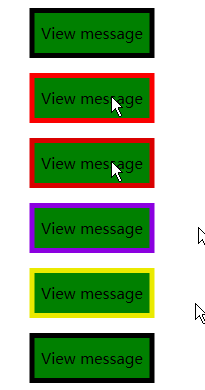
运行测试
评论:
发表评论: