WPF—模板Template
post by:追风剑情 2019-8-27 12:16
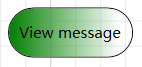
示例:渐变按钮
<Window
    xmlns="http://schemas.microsoft.com/winfx/2006/xaml/presentation"
    xmlns:x="http://schemas.microsoft.com/winfx/2006/xaml"
    xmlns:d="http://schemas.microsoft.com/expression/blend/2008"
    xmlns:mc="http://schemas.openxmlformats.org/markup-compatibility/2006"
    xmlns:local="clr-namespace:WpfTest"
    xmlns:Properties="clr-namespace:WpfTest.Properties"
    xmlns:wpf="http://schemas.microsoft.com/netfx/2007/xaml/presentation" x:Class="WpfTest.MainWindow"
    mc:Ignorable="d"
    Title="MainWindow" Height="250" Width="200">
    <!--资源通常定义在根节点,或者资源字典中-->
    <Window.Resources>
        <!--定义一个渐变按钮模板-->
        <!--如果不定义x:Key,表示对所有Button应用此样式-->
        <Style TargetType="Button">
            <Setter Property="Template">
                <Setter.Value>
                    <ControlTemplate TargetType="Button">
                        <Border x:Name="Border" CornerRadius="20" BorderThickness="1" BorderBrush="Black">
                            <Border.Background>
                                <LinearGradientBrush StartPoint="0,0.5" EndPoint="1,0.5">
                                    <GradientStop Color="{Binding Background.Color,
                                        RelativeSource={RelativeSource TemplatedParent}}"
                                        Offset="0.0" />
                                    <GradientStop Color="White" Offset="0.9" />
                                </LinearGradientBrush>
                            </Border.Background>
                            <ContentPresenter Margin="2" HorizontalAlignment="Center" VerticalAlignment="Center" RecognizesAccessKey="True"/>
                        </Border>
                        <ControlTemplate.Triggers>
                            <!--Change the appearance of the button when the user clicks it.-->
                            <Trigger Property="IsPressed" Value="true">
                                <Setter TargetName="Border" Property="Background">
                                    <Setter.Value>
                                        <LinearGradientBrush StartPoint="0,0.5" EndPoint="1,0.5">
                                            <GradientStop Color="{Binding Background.Color,
                                                RelativeSource={RelativeSource TemplatedParent}}"
                                                Offset="0.0" />
                                            <GradientStop Color="DarkSlateGray" Offset="0.9" />
                                        </LinearGradientBrush>
                                    </Setter.Value>
                                </Setter>
                            </Trigger>
                        </ControlTemplate.Triggers>
                    </ControlTemplate>
                </Setter.Value>
            </Setter>
        </Style>
    </Window.Resources>

    <Grid>
        <Button Name="submitName" Width="100" Height="40" Background="Green">View message</Button>
    </Grid>
</Window>
效果截图
评论:
发表评论: