WPF—ComboBox
post by:追风剑情 2019-8-19 12:05
示例
MainWindow.xaml
<Window
        xmlns="http://schemas.microsoft.com/winfx/2006/xaml/presentation"
        xmlns:x="http://schemas.microsoft.com/winfx/2006/xaml"
        xmlns:d="http://schemas.microsoft.com/expression/blend/2008"
        xmlns:mc="http://schemas.openxmlformats.org/markup-compatibility/2006"
        xmlns:local="clr-namespace:WpfTest"
        xmlns:Properties="clr-namespace:WpfTest.Properties" x:Class="WpfTest.MainWindow"
        mc:Ignorable="d"
        Title="MainWindow" Height="450" Width="800">
    <Grid>
        <!--DisplayMemberPath=指定要显示的属性名-->
        <ComboBox Name="comboBox" DisplayMemberPath="Name" SelectedValuePath="ID" SelectedIndex="0" SelectionChanged="comboBox_SelectionChanged"  HorizontalAlignment="Left" Margin="25,20,0,0" VerticalAlignment="Top" Width="120"/>

    </Grid>
</Window>
MainWindow.xaml.cs
using System;
using System.Collections.Generic;
using System.Linq;
using System.Text;
using System.Windows;
using System.Windows.Controls;
using System.Windows.Data;
using System.Windows.Documents;
using System.Windows.Input;
using System.Windows.Media;
using System.Windows.Media.Imaging;
using System.Windows.Navigation;
using System.Windows.Shapes;
using System.ComponentModel;//INotifyPropertyChanged

namespace WpfTest
{
    /// <summary>
    /// MainWindow.xaml 的交互逻辑
    /// </summary>
    public partial class MainWindow : Window
    {
        public MainWindow()
        {
            InitializeComponent();
            Init();
        }

        private void Init()
        {
            List<Student> list = new List<Student>();
            list.Add(new Student { ID = 1001, Name = "小一" });
            list.Add(new Student { ID = 1002, Name = "小二" });
            list.Add(new Student { ID = 1003, Name = "小三" });
            this.comboBox.ItemsSource = list;
        }

        private void comboBox_SelectionChanged(object sender, SelectionChangedEventArgs e)
        {
            ComboBox cb = sender as ComboBox;
            Student st = cb.SelectedItem as Student;

            Console.WriteLine("SelectedIndex={0}", cb.SelectedIndex);
            Console.WriteLine("Selection: {0}", st.ToString());
        }
    }

    public class Student
    {
        public int ID { get; set; }
        public string Name { get; set; }

        public override string ToString()
        {
            return string.Format("ID={0}, Name={1}", ID, Name);
        }
    }
}
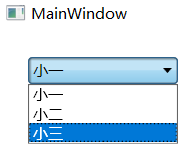
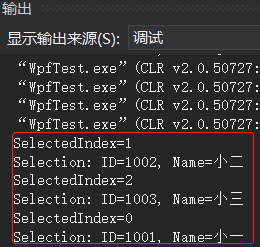
运行测试
评论:
发表评论: