WPF—INotifyPropertyChanged
post by:追风剑情 2019-8-16 14:45
示例
XAML
<Window x:Class="WpfTest.MainWindow"
        xmlns="http://schemas.microsoft.com/winfx/2006/xaml/presentation"
        xmlns:x="http://schemas.microsoft.com/winfx/2006/xaml"
        xmlns:d="http://schemas.microsoft.com/expression/blend/2008"
        xmlns:mc="http://schemas.openxmlformats.org/markup-compatibility/2006"
        xmlns:local="clr-namespace:WpfTest"
        mc:Ignorable="d"
        Title="MainWindow" Height="450" Width="800">
    <Grid>
        <Button Content="Button" HorizontalAlignment="Left" Margin="20,26.213,0,0" VerticalAlignment="Top" Width="75" Click="Button_Click"/>
        <TextBlock Name="textBlock" Text="{Binding Path=Name}" HorizontalAlignment="Left" Margin="134.8,27.813,0,0" TextWrapping="Wrap" VerticalAlignment="Top" Width="80.2"/>

    </Grid>
</Window>
代码
using System;
using System.Collections.Generic;
using System.Linq;
using System.Text;
using System.Windows;
using System.Windows.Controls;
using System.Windows.Data;
using System.Windows.Documents;
using System.Windows.Input;
using System.Windows.Media;
using System.Windows.Media.Imaging;
using System.Windows.Navigation;
using System.Windows.Shapes;
using System.ComponentModel;//INotifyPropertyChanged

namespace WpfTest
{
    /// <summary>
    /// MainWindow.xaml 的交互逻辑
    /// </summary>
    public partial class MainWindow : Window
    {
        private Student student = new Student();
        public MainWindow()
        {
            InitializeComponent();

            textBlock.DataContext = student;
        }

        private void Button_Click(object sender, RoutedEventArgs e)
        {
            student.Name = "New-Name";
        }
    }

    /// <summary>
    /// INotifyPropertyChanged接口可实现数据到UI的通知
    /// (即当数据变化时通知UI更新显示)
    /// </summary>
    public class Student : INotifyPropertyChanged
    {
        public event PropertyChangedEventHandler PropertyChanged;

        private string m_Name = "Default-Name";

        public string Name
        {
            get { return m_Name; }
            set {
                m_Name = value;
                //通知UI更新显示
                PropertyChanged?.Invoke(this, new PropertyChangedEventArgs("Name"));
            }
        }
    }
}
运行测试
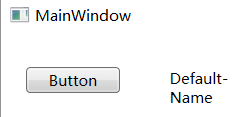
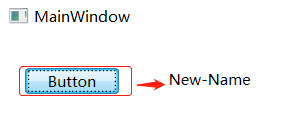
评论:
发表评论: