UGUI-文字颜色渐变效果
post by:追风剑情 2019-7-10 15:11
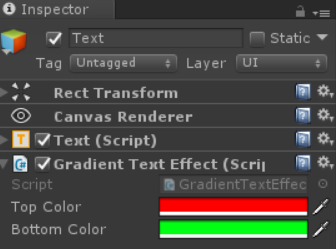
示例
using System.Collections;
using System.Collections.Generic;
using UnityEngine;
using UnityEngine.UI;
/// <summary>
/// 文本颜色渐变效果
/// </summary>
public class GradientTextEffect : BaseMeshEffect
{
    public Color32 topColor = Color.white;
    public Color32 bottomColor = Color.yellow;

    public override void ModifyMesh(VertexHelper vh)
    {
        if (!IsActive())
            return;

        if (vh.currentVertCount == 0)
            return;

        //ListPool类参见 http://www.devacg.com/?post=1026
        var output = ListPool<UIVertex>.Get();
        vh.GetUIVertexStream(output);

        ApplyGradient(output);
        vh.Clear();
        vh.AddUIVertexTriangleStream(output);
        ListPool<UIVertex>.Release(output);
    }

    private void ApplyGradient(List<UIVertex> verts)
    {
        float topY = 0;
        float bottomY = 0;
        for (int i = 0; i < verts.Count; i++)
        {
            float y = verts[i].position.y;
            if (y > topY)
                topY = y;
            else if (y < bottomY)
                bottomY = y;
        }

        //计算出文字高度
        float height = topY - bottomY;

        for (int i=0; i<verts.Count; i++)
        {
            UIVertex v = verts[i];
            Color32 color = Color32.Lerp(bottomColor, topColor, (v.position.y - bottomY)/height);
            v.color = color;
            verts[i] = v;
        }
    }
}
效果

评论:
发表评论: