WPF实现拖动
post by:追风剑情 2019-6-26 15:09
XAML官方文档 https://docs.microsoft.com/zh-cn/dotnet/framework/wpf/advanced/xaml-overview-wpf
WPF实现拖动
示例:拖动UserControl一、App.xml中定义拖动条样式
<Application x:Class="Test.App"
             xmlns="http://schemas.microsoft.com/winfx/2006/xaml/presentation"
             xmlns:x="http://schemas.microsoft.com/winfx/2006/xaml"
             xmlns:local="clr-namespace:Test"
             StartupUri="LoginWindow.xaml">
    <Application.Resources>
        <Style x:Key="Style.TopDragBarButton"
               TargetType="ButtonBase">
            <Setter Property="Width" Value="780" />
            <Setter Property="Height" Value="20" />
            <Setter Property="FontSize" Value="12" />
            <Setter Property="Background" Value="#FF4F4E4E" />
            <Setter Property="HorizontalContentAlignment" Value="Center" />
            <Setter Property="VerticalContentAlignment" Value="Center" />
            <Setter Property="Foreground" Value="#FFFFFFFF" />
            <Setter Property="Template">
                <Setter.Value>
                    <ControlTemplate TargetType="{x:Type ButtonBase}">
                        <Border x:Name="Border" Width="{TemplateBinding Width}"
                                Height="{TemplateBinding Height}"
                                CornerRadius="0" Background="{TemplateBinding Background}">
                            <TextBlock x:Name="TextBlock"
                                       Text="{TemplateBinding Content}"
                                       FontSize="{TemplateBinding FontSize}"
                                       HorizontalAlignment="{TemplateBinding HorizontalContentAlignment}"
                                       VerticalAlignment="{TemplateBinding VerticalContentAlignment}" />
                        </Border>

                        <ControlTemplate.Triggers>
                            <Trigger Property="IsPressed" Value="True">
                                <Setter Property="Background"
                                        Value="#FF4F4E4E" />
                                <Setter TargetName="TextBlock" Property="Foreground" Value="#FFFFFFFF" />
                            </Trigger>
                            <Trigger Property="IsEnabled" Value="False">
                                <Setter TargetName="Border" Property="Background" Value="#4D0087FF" />
                                <Setter TargetName="TextBlock" Property="Foreground" Value="#4DFFFFFF" />
                            </Trigger>
                        </ControlTemplate.Triggers>
                    </ControlTemplate>
                </Setter.Value>
            </Setter>
        </Style>
    </Application.Resources>
</Application>
二、在要拖动的UserControl界面中加入
<Button Name="topBar" Content="拖动条" Style="{StaticResource Style.TopDragBarButton}" />
三、控制拖动的代码
using System;
using System.Collections.Generic;
using System.Linq;
using System.Text;
using System.Threading.Tasks;
using System.Windows;
using System.Windows.Controls;
using System.Windows.Data;
using System.Windows.Documents;
using System.Windows.Input;
using System.Windows.Media;
using System.Windows.Media.Imaging;
using System.Windows.Navigation;
using System.Windows.Shapes;
using System.ComponentModel;
using System.Timers;
using System.Windows.Threading;

namespace Test
{
    public class DragBar
    {
        public UserControl target;

        private Point downPoint;
        private Thickness orgThickness;
        private Thickness tmpThickness = new Thickness();

        public DragBar()
        {

        }

        public void PreviewMouseLeftButtonDown(object sender, MouseButtonEventArgs e)
        {
            downPoint = Mouse.GetPosition(null);
            orgThickness = target.Margin;
        }

        public void PreviewMouseMove(object sender, MouseEventArgs e)
        {
            Point mousePos = Mouse.GetPosition(null);
            Vector diff = mousePos - downPoint;

            if (e.LeftButton == MouseButtonState.Pressed &&
                Math.Abs(diff.X) > SystemParameters.MinimumHorizontalDragDistance &&
                Math.Abs(diff.Y) > SystemParameters.MinimumVerticalDragDistance)
            {
                double x = orgThickness.Left + diff.X;
                double y = orgThickness.Top + diff.Y;
                tmpThickness.Left = x;
                tmpThickness.Top = y;
                tmpThickness.Right = -x;
                tmpThickness.Bottom = -y;
                target.Margin = tmpThickness;
            }
        }
    }
}
四、为子窗口加入拖动功能
using System;
using System.Collections.Generic;
using System.Linq;
using System.Text;
using System.Threading.Tasks;
using System.Windows;
using System.Windows.Controls;
using System.Windows.Data;
using System.Windows.Documents;
using System.Windows.Input;
using System.Windows.Media;
using System.Windows.Media.Imaging;
using System.Windows.Navigation;
using System.Windows.Shapes;
using System.ComponentModel;
using System.Timers;
using System.Windows.Threading;

namespace Test
{
    /// <summary>
    /// Interaction logic for UserControl.xaml
    /// </summary>
    public partial class PanelWindow : UserControl
    {
        private DragBar dragBar = new DragBar();

        public PassportWindow()
        {
            InitializeComponent();
            Initialize();
        }

        private void Initialize()
        {
            dragBar.target = this;//设置拖动目标
            topBar.AddHandler(Button.PreviewMouseLeftButtonDownEvent, new MouseButtonEventHandler(dragBar.PreviewMouseLeftButtonDown), true);
            topBar.AddHandler(Button.MouseMoveEvent, new MouseEventHandler(dragBar.PreviewMouseMove), true);
        }
    }
}
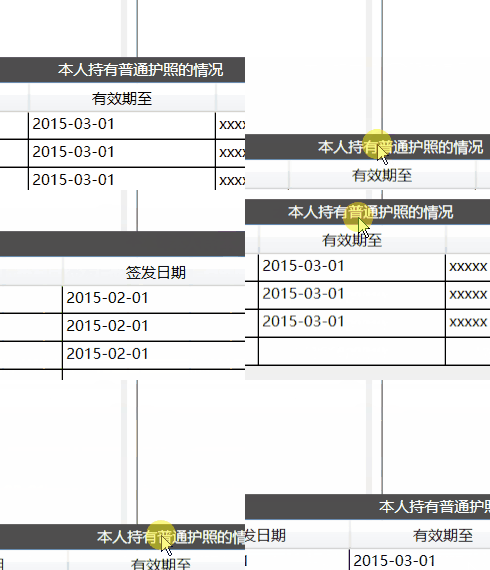
运行测试
评论:
发表评论: