物体沿贝塞尔曲线运动
post by:追风剑情 2019-5-23 21:45
一、新建场景,如图
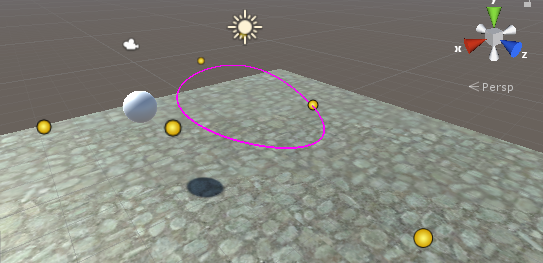
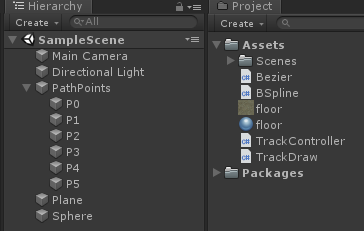
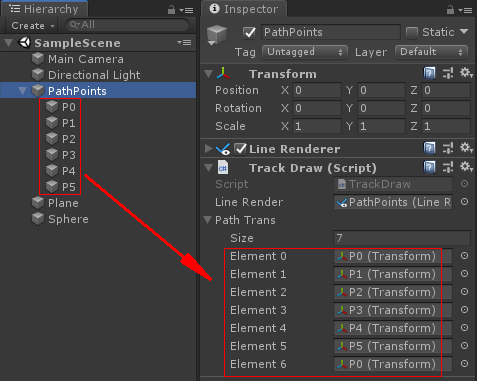
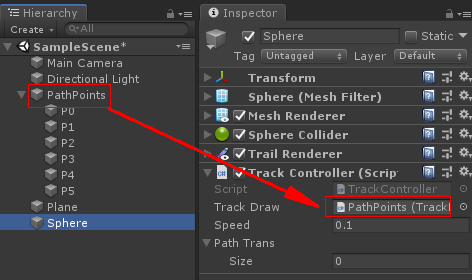
TrackDraw.cs
using System.Collections; using System.Collections.Generic; using UnityEngine; ////// 在场景中显示轨迹 /// [ExecuteInEditMode] public class TrackDraw : MonoBehaviour { public bool ShowTrack = true; public LineRenderer lineRender; public int linePointCount = 51; public bool UseWorldPosition = true; public Transform[] PathTrans; private Vector3[] pathPos; private Vector3[] pathWorldPos; private Vector3[] pathLocalPos; private Vector3[] linePos; void UpdatePathData() { if (pathPos == null || pathPos.Length != PathTrans.Length) { pathPos = new Vector3[PathTrans.Length]; pathWorldPos = new Vector3[PathTrans.Length]; pathLocalPos = new Vector3[PathTrans.Length]; } for (int i = 0; i < PathTrans.Length; i++) { Vector3 pos = UseWorldPosition ? PathTrans[i].position : PathTrans[i].localPosition; pathPos[i] = pos; pathWorldPos[i] = PathTrans[i].position; pathLocalPos[i] = PathTrans[i].localPosition; } } void ShowPath() { UpdatePathData(); if (linePos == null || linePos.Length <= 0 || linePos.Length != linePointCount) linePos = new Vector3[linePointCount]; int i = 0; for (float t = 0; t <= 1; t += 0.02f) { Vector3 tp = Bezier.Lerp(pathPos, t); linePos[i++] = tp; } if (lineRender == null) { lineRender = gameObject.GetComponent(); if (lineRender == null) lineRender = gameObject.AddComponent (); } lineRender.positionCount = linePos.Length; lineRender.SetPositions(linePos); } private void OnDrawGizmos() { if (ShowTrack) ShowPath(); else lineRender.positionCount = 0; } // 使用世界坐标插值 t=[0, 1] public Vector3 Lerp(float t) { if (pathPos == null) UpdatePathData(); return Bezier.Lerp(pathPos, t); } // 使用本地坐标插值 t=[0, 1] public Vector3 LocalLerp(float t) { if (pathLocalPos == null) UpdatePathData(); return Bezier.Lerp(pathLocalPos, t); } }
TrackController.cs
using System.Collections;
using System.Collections.Generic;
using UnityEngine;

/// <summary>
/// 轨迹控制器
/// </summary>
public class TrackController : MonoBehaviour
{
    public TrackDraw trackDraw;
    public double speed = 0.02;
    public Transform[] PathTrans;

    private Bezier.Point[] points;
    private Transform mTransform;
    private double t = 0;

    void Start()
    {
        mTransform = transform;
        CopyTrackDrawPath();
        points = new Bezier.Point[PathTrans.Length];
        for (int i=0; i < PathTrans.Length; i++)
        {
            Vector3 pos = PathTrans[i].position;
            Bezier.Point p = new Bezier.Point();
            p.x = pos.x;
            p.y = pos.y;
            p.z = pos.z;
            points[i] = p;
        }
    }

    void Update()
    {
        MoveTo(t);
        t += speed * Time.deltaTime;

        if (t > 1) t -= 1;

        Debug.Log(t);
    }

    void MoveTo(double t)
    {
        Bezier.Point tp = Bezier.Lerp(points, t);
        Vector3 pos = mTransform.position;
        pos.x = (float)tp.x;
        pos.y = (float)tp.y;
        pos.z = (float)tp.z;
        mTransform.position = pos;
    }

    [ContextMenu("Copy TrackDraw Path")]
    private void CopyTrackDrawPath()
    {
        if (trackDraw == null)
            return;
        PathTrans = new Transform[trackDraw.PathTrans.Length];
        for (int i = 0; i < PathTrans.Length; i++)
            PathTrans[i] = trackDraw.PathTrans[i];
    }
}
Bezier.cs
using System.Collections;
using System.Collections.Generic;
using UnityEngine;

/// <summary>
/// 贝塞尔曲线
/// 参见 http://www.devacg.com/?post=912
/// </summary>
public class Bezier
{
    /// <summary>
    /// 作图法算法实现
    /// </summary>
    /// <param name="P">控制点坐标</param>
    /// <param name="t">插值参数</param>
    /// <returns>返回曲线在参数t的坐标值</returns>
    public static Point Lerp(Point[] P, double t)
    {
        int m, i;//m 边数
        int n = P.Length; //n 控制点个数
        Point P0 = null;
        Point[] R, Q;
        R = new Point[n];
        Q = new Point[n];
        for (i = 0; i < n; i++)
        {
            R[i] = P[i];//将控制点坐标P保存于R中
            Q[i] = new Point();
        }

        //作n次外部循环,
        //每次循环都计算控制多边形上所有的m条边以参数t为分割比例的坐标值
        for (m = n - 1; m > 0; m--)
        {
            //作m次内部循环,
            //每次循环计算控制多边形上一条边以参数t为分割比例的坐标值
            for (i = 0; i <= m - 1; i++)
            {
                //n次Bezier曲线在点t的值,可由两条n-1次bezier曲线
                //在点t的值通过线性组合而求得
                Q[i].x = R[i].x + t * (R[i + 1].x - R[i].x);
                Q[i].y = R[i].y + t * (R[i + 1].y - R[i].y);
                Q[i].z = R[i].z + t * (R[i + 1].z - R[i].z);
            }
            for (i = 0; i <= m - 1; i++)
                R[i] = Q[i];
        }
        P0 = R[0];
        R = null;
        Q = null;
        return P0;
    }

    public class Point
    {
        public double x;
        public double y;
        public double z;
    }
}
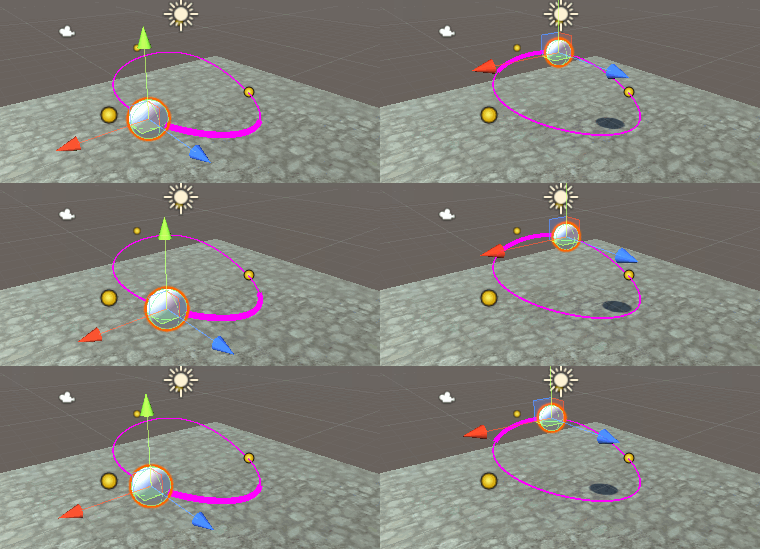
运行测试
评论:
发表评论: